MongoDB vector store
The MongoDBVector class provides vector search using MongoDB Vector Search. It enables efficient similarity search and metadata filtering within your MongoDB collections.
InstallationDirect link to Installation
- npm
- pnpm
- Yarn
- Bun
npm install @mastra/mongodb@latest
pnpm add @mastra/mongodb@latest
yarn add @mastra/mongodb@latest
bun add @mastra/mongodb@latest
Usage exampleDirect link to Usage example
import { MongoDBVector } from '@mastra/mongodb'

const store = new MongoDBVector({
  id: 'mongodb-vector',
  uri: process.env.MONGODB_URI,
  dbName: process.env.MONGODB_DB_NAME,
})
Custom embedding field pathDirect link to Custom embedding field path
If you need to store embeddings in a nested field structure (e.g., to integrate with existing MongoDB collections), use the embeddingFieldPath option:
import { MongoDBVector } from '@mastra/mongodb'

const store = new MongoDBVector({
  id: 'mongodb-vector',
  uri: process.env.MONGODB_URI,
  dbName: process.env.MONGODB_DB_NAME,
  embeddingFieldPath: 'text.contentEmbedding', // Store embeddings at text.contentEmbedding
})
Constructor optionsDirect link to Constructor options
id:
uri:
dbName:
options?:
embeddingFieldPath?:
autoEmbed?:
{ model: 'voyage-4' }. An index created without its own autoEmbed or dimension uses these settings, which makes the store embed text server-side instead of receiving vectors.MethodsDirect link to Methods
connect()Direct link to connect
Establishes connection to the MongoDB server. This is called automatically on first use, but can be called explicitly if needed.
await store.connect()
createIndex()Direct link to createindex
Creates a new vector index (collection) in MongoDB. When calls for the same new name run concurrently and ask for the same collection and embedding, all of them succeed. If they ask for different ones, the later call throws CONFLICT naming what differs.
indexName:
dimension?:
autoEmbed is set, where the embedding model determines the dimension. Passing both is an error.autoEmbed?:
metric?:
filterFields?:
metadata.<field>). Queries that filter only on declared fields are pushed directly into $vectorSearch instead of pre-filtering candidate _ids, avoiding the 16 MB BSON limit on large result sets. Filters that reference an undeclared field, or use an operator $vectorSearch does not support, fall back to the pre-filter automatically. On a bring-your-own index, names are declared as written (for example, lane or specs.gpu), so metadataMode: 'document' filters can use them.collectionName?:
indexName. A managed collection is created with validationLevel: 'off', which has no effect without a validator. It lets Mastra tell a collection it created from one another client created at the same moment with other options, which Mastra adopts and never drops.searchIndexName?:
${indexName}_vector_index.allowWrites?:
upsert, updateVector, deleteVector, and deleteVectors on a bring-your-own collection, which is read-only by default. Ignored for managed collections, which are always writable. The policy is persisted with the index registration and survives restarts. See the warning under Indexing an existing collection.waitForIndexReady()Direct link to waitforindexready
Waits for an index to become ready after creation. Useful when you need to ensure an index is ready before performing operations.
indexName:
timeoutMs?:
checkIntervalMs?:
upsert()Direct link to upsert
Adds or updates vectors and their metadata in the collection. On a bring-your-own index, this requires the deprecated allowWrites: true option at createIndex() time because BYO collections are read-only by default.
indexName:
vectors?:
autoEmbed, where MongoDB generates them from documents and supplying vectors is an error.metadata?:
ids?:
documents?:
autoEmbed index this is the text MongoDB embeds, and it is required.query()Direct link to query
Searches for similar vectors with optional metadata filtering.
indexName:
queryVector?:
queryText, not both.queryText?:
autoEmbed indexes only, and mutually exclusive with queryVector. For full-text matching use textQuery() instead.model?:
queryText, and must be compatible with the index's model.topK?:
filter?:
metadata field)documentFilter?:
includeVector?:
numCandidates?:
metadataMode?:
'field' (default) projects the managed metadata/document fields, and filter fields are matched against the metadata subdocument. 'document' returns the full source document as metadata — use for bring-your-own operational collections whose documents have their own shape — and filter fields are matched against the **root** document (no metadata. prefix). The embedding field is omitted from metadata by default (to avoid payload bloat); set includeVector: true to retain it in metadata and also expose it as a top-level vector.BYO filter declarations after upgradingDirect link to BYO filter declarations after upgrading
BYO filterFields are now declared exactly as written. Earlier versions prefixed bare declarations with metadata.. If your BYO documents store values under metadata and you use the default metadataMode: 'field', declare the full paths, such as filterFields: ['metadata.category']. Keep the query filter as { category: 'billing' }.
For root-level BYO fields, use filterFields: ['category'] with metadataMode: 'document'. If you rebuild an index with root-level declarations but still query nested metadata, filtering falls back to the bounded pre-filter instead of running inside $vectorSearch. To change an existing search index's field declarations, update its definition in MongoDB rather than registering it again. After the updated index reaches READY, create a new MongoDBVector instance and use it for subsequent queries so it loads the updated declarations instead of cached paths. Otherwise, large nested-metadata queries can continue to hit TOO_MANY_CANDIDATES even after you add the required filter paths.
Filters that can't run inside $vectorSearchDirect link to filters-that-cant-run-inside-vectorsearch
A filter runs inside $vectorSearch only when every field it uses is declared in filterFields and every operator is one $vectorSearch supports. Otherwise query() and hybridQuery() first run the filter as a $match, load the matching _ids into memory, and pass them to $vectorSearch. Without a regular index on the filtered fields, that step scans the collection. If more than 100,000 documents match or their candidate _id array exceeds 12 MiB of BSON, the query throws TOO_MANY_CANDIDATES. The byte budget leaves room for the rest of the MongoDB command. Long string IDs can reach it before the document-count limit.
Results come back as a complete array of at most 10,000 hits. Memory use grows with topK, includeVector, and document size, and metadataMode: 'document' returns full source documents.
createSearchIndex()Direct link to createsearchindex
Provisions a MongoDB Search (BM25/full-text) index on the collection backing an index and records it as the text-search index that textQuery() and hybridQuery() will target.
Managed vs. bring-your-own collections:
- For a managed index (created without
collectionName),createIndex()already provisions a dynamic full-text index named${collectionName}_search_index(covering all string fields).createSearchIndex()is therefore only needed when you want a field-restricted mapping or a custom index name. - For a bring-your-own index (created with
collectionName),createIndex()doesn't auto-create any full-text index. EnablingtextQuery()/hybridQuery()on a caller-owned operational collection is opt-in. CallcreateSearchIndex()explicitly to provision the (billable) text index. Until you do,textQuery()/hybridQuery()throw a clear error rather than querying a non-existent index.
Naming:
- When
fieldsis provided without an explicitsearchIndexName, the field-mapped index is created under a distinct default name (${collectionName}_${indexName}_search_fields_index, unique per logical index) so it doesn't collide with a managed collection's auto-created dynamic index and get silently ignored. This distinct index is persisted as the text-search index, sotextQuery()/hybridQuery()use the restricted mapping automatically. - When
searchIndexNameis provided, that exact name is used and persisted.textQuery()/hybridQuery()resolve the persisted name automatically. You can also override the name per call via theirsearchIndexName/textSearchIndexNameparameters.
indexName:
fields?:
metadata.name. Omit for dynamic mapping (all string fields).searchIndexName?:
fields is provided and this is omitted, a distinct default name that is unique per logical index is used, so the field mapping is not shadowed by the auto-created dynamic index and two logical indexes on the same collection do not collide.waitUntilReady?:
waitForSearchIndexReady() explicitly if you prefer to await separately.await store.createSearchIndex({
indexName: 'precedents',
fields: ['note', 'description'],
})
The field-mapped index name includes the logical indexName, so two logical indexes on the same collection get distinct text indexes. Calling createSearchIndex() again for the same logical index with different fields updates the existing text index definition in place if Mastra created it. You don't need to drop it first. Mastra never changes a full-text index it didn't create: an existing index with the requested name is reused only when its whole definition is equivalent to the one requested: field types, analyzers (including the root analyzer and searchAnalyzer), nested fields, storedSource and synonyms. Defaults that Atlas echoes back, such as indexOptions: 'offsets', store: true, norms: 'include' and an empty fields, count as equivalent. Otherwise createSearchIndex() throws a CONFLICT error. When the registration predates ownership records, the message suggests claimLegacyIndex().
waitForSearchIndexReady()Direct link to waitforsearchindexready
Waits for the full-text (BM25) search index of an index to become READY. waitForIndexReady() polls only the vectorSearch index; createSearchIndex() returns while the MongoDB Search full-text index is still building, so an immediate textQuery()/hybridQuery() can intermittently fail. Call this (or pass waitUntilReady: true to createSearchIndex()) to block until the resolved text index reports READY.
indexName:
searchIndexName?:
timeoutMs?:
checkIntervalMs?:
await store.createSearchIndex({ indexName: 'precedents', fields: ['note'] })
await store.waitForSearchIndexReady({ indexName: 'precedents' })
textQuery()Direct link to textquery
Runs a full-text (BM25) search against a MongoDB Search index. By default it targets the text-search index recorded for this index (set by createSearchIndex(), or the dynamic ${collectionName}_search_index auto-created by createIndex()). Pass searchIndexName to target a specific index for this call.
Metadata filters here (like hybridQuery()) are applied via a $match stage. For the vector branch of hybridQuery(), filters on fields not declared via filterFields at index creation are transparently materialised as candidate _ids (the same fallback query() uses), so undeclared-field filters don't error.
indexName:
query:
paths:
topK?:
filter?:
metadata field)metadataMode?:
'field' (default) projects the managed metadata/document fields. 'document' returns the full source document as metadata.searchIndexName?:
createSearchIndex() / createIndex().const results = await store.textQuery({
indexName: 'precedents',
query: 'shell company offshore',
paths: ['note'],
topK: 10,
})
hybridQuery()Direct link to hybridquery
Runs a hybrid search that fuses vector similarity with full-text results through MongoDB's server-side $rankFusion. The feature requires MongoDB 8.0 or later. A full-text search index must exist. Managed indexes create one automatically, while bring-your-own collections require an explicit createSearchIndex() call.
indexName:
queryVector?:
queryText, not both.queryText?:
autoEmbed indexes only. Independent of query, so each branch can search for something different.model?:
queryText.query:
paths:
topK?:
filter?:
weights?:
numCandidates?:
metadataMode?:
'field' (default) projects the managed metadata/document fields. 'document' returns the full source document as metadata.textSearchIndexName?:
createSearchIndex() / createIndex().const results = await store.hybridQuery({
indexName: 'precedents',
queryVector: embedding,
query: 'shell company offshore',
paths: ['note'],
topK: 10,
weights: { vector: 1, text: 1.5 }, // Favor text matches
})
hybridQuery() requires MongoDB 8.0 or later for the $rankFusion stage. If your deployment is older or lacks $rankFusion, run query() and textQuery() separately before merging the results client-side.
Per-branch options and native rerankingDirect link to Per-branch options and native reranking
hybridQuery() also accepts separate vector and text options. Use this form to set a different retrieval limit for each branch, and optionally rerank the fused results before the final topK limit. Existing calls that use the parameters above don't change.
This form has the same $rankFusion requirements and registered indexes. For bring-your-own collections, register a full-text index with createSearchIndex() or pass text.searchIndexName.
Native $rerank requires Atlas running MongoDB 9.0 or later with Native Reranking enabled in the project's settings. The default rerank-2.5 model isn't in Preview. In native $rerank, the rerank-3 and rerank-3-lite models are in Preview and require a dedicated M10-or-higher cluster. The same models are out of Preview in the Voyage AI API. Self-managed and Atlas Local deployments don't support native reranking. No separate Voyage AI client or application-side API key is required.
With an initialized store, registered indexes, an embedding you generated, and text stored in metadata.text, retrieve candidates and rerank them in one call:
const results = await store.hybridQuery({
  indexName: 'articles',
  vector: { queryVector: embedding, limit: 50, numCandidates: 1000 },
  text: { query: question, paths: ['metadata.text'], limit: 50 },
  rerank: { query: question, paths: ['metadata.text'], numDocsToRerank: 50 },
  topK: 5,
})
Each retrieval branch contributes up to its own limit documents. $rerank evaluates up to numDocsToRerank fused documents, then topK limits the response. The reranker receives source documents before projection, so text.paths and rerank.paths are relative to the document root, for both managed and bring-your-own collections.
This form has no metadataMode option. Managed indexes return the managed metadata and document fields. Bring-your-own indexes return the source document as metadata, excluding the embedding field. With includeVector: true, metadata keeps the embedding field and the result also returns it as vector.
On an autoEmbed index, use vector.query instead of vector.queryVector. Omit rerank to return fused results without reranking:
const results = await store.hybridQuery({
  indexName: 'articles_auto',
  vector: { query: question, limit: 50 },
  text: { query: question, paths: ['document'], limit: 50 },
  topK: 5,
})
indexName:
topK?:
filter?:
filterFields run inside $vectorSearch. Other filters use the `_id` pre-filter, as in the flat form.weights?:
includeVector?:
vector. Not supported on autoEmbed indexes, which throw an error.vector:
vector.queryVector?:
autoEmbed indexes, which throw an error; use vector.query instead.vector.query?:
vector.model?:
vector.limit?:
vector.numCandidates?:
vector.limit.vector.searchIndexName?:
_id as a filter field. It must also index the registered embedding field with the same embedding mode (vectors or autoEmbed); otherwise MongoDB rejects the query. Managed indexes throw an error.text:
text.query:
text.paths:
text.searchIndexName?:
text.limit?:
rerank?:
rerank.query:
rerank.paths:
rerank.model?:
rerank.numDocsToRerank:
Returns QueryResult[] in final relevance order. score is the native reranking score when reranking is enabled, or the fusion score otherwise. These scores use different scales.
Invalid requests throw MastraError. Server failures preserve their causes, including unavailable reranking, unsupported models, and missing source fields. The method never silently substitutes a model or skips reranking.
describeIndex()Direct link to describeindex
Returns information about the index (collection).
indexName:
Returns:
interface IndexStats {
  dimension: number
  count: number
  metric?: 'cosine' | 'euclidean' | 'dotproduct'
}
On an autoEmbed index, dimension is read from the index definition and reports MongoDB's default of 1024 when the index doesn't pin one. metric is omitted when the autoEmbed index doesn't specify a similarity. count counts documents that carry the embedded text field, since the generated vectors aren't stored on your documents.
count is an exact count of the documents that carry the embedding field. On a large collection without a regular MongoDB index on that field, the count scans the collection, so avoid calling describeIndex() from request paths or health checks. upsert() and updateVector() read the dimension from the index definition and don't count documents.
deleteIndex()Direct link to deleteindex
Deletes a vector index. Mastra records which search indexes and collections it created, and drops only those:
- Managed index (created without
collectionName): drops the collection and all its data. If a collection with that name already existed whencreateIndex()ran, Mastra keeps it and drops only the search indexes it created. Managed indexes created before@mastra/mongodb@1.15.0, or registered by 1.15 through 1.27 without an ownership record, aren't dropped until you callclaimLegacyIndex()for them. - Bring-your-own index (created with
collectionName): drops the vector and full-text indexes Mastra created. The collection and its documents are kept.
Mastra keeps any search index that existed before createIndex() or createSearchIndex() ran, that another logical index still uses, or that an earlier version registered. Drop those yourself if you no longer need them. Pointing an index at a different searchIndexName counts as a new index that Mastra doesn't own unless that call creates it. If Mastra created the old vector index, it keeps cleanup responsibility for it and drops it when the logical index is deleted. When one logical index is deleted and another registration still uses a search index, Mastra keeps that index and passes cleanup responsibility to the other registration. The last registration to be deleted drops it. Renaming a text index with createSearchIndex() keeps responsibility for the old index Mastra created, and Mastra drops it when the logical index is deleted, not at rename time.
deleteIndex() throws these errors:
NOT_REGISTERED: the name has no registration, and nothing is dropped. If the collection predates@mastra/mongodb@1.15.0, callclaimLegacyIndex()first.OWNERSHIP_UNKNOWN: a managed index registered by 1.15 through 1.27 has no ownership record. CallclaimLegacyIndex()first.IN_USE: another registration still uses the managed collection. Mastra checks this again when you retry a stalled delete.CAPABILITY_CHECK_FAILED: the check for transaction support failed. Nothing changed, so retry.OUTCOME_UNKNOWN: MongoDB couldn't confirm whether the delete committed. Retry. If the retry throwsNOT_REGISTERED, the delete completed. A retry deletes whatever is registered under the name at that point, and no read can tell the original registration from a re-created one. If another process may re-create the index, coordinate with it before you retry. Don't retry by name if you can't rule out a re-create.
createIndex(), createSearchIndex() and claimLegacyIndex() throw INDEX_DELETING while a delete is half-finished, and while Mastra is still removing a search index it created under the same name (see cleanup errors and logs). Retrying deleteIndex() resumes and finishes a half-finished delete.
Concurrent deletes of indexes that share a collection are coordinated with transactions on Atlas, Atlas Local and replica sets. On a standalone server they aren't, and neither is a create that runs during a delete, so don't run them concurrently there. A createIndex() or createSearchIndex() call that starts using a search index a running deleteIndex() is about to drop throws INDEX_DELETING. Retry it once the delete finishes. Retrying is safe: if the delete already handed the search index to the new registration, that registration is kept and drops the index when it's deleted. A call throws CONFLICT and provisions nothing when, before its last check ahead of provisioning, deleteIndex() removes its registration or another call changes the registration's collection or the names of the search indexes the call is about to create. A createSearchIndex() call also throws CONFLICT when another call changed the registration after it was read. A createIndex() call on an existing registration throws CONFLICT and changes nothing when the registration was deleted or recreated after it was read. A registration created by an earlier version is the exception: the call re-reads it once and proceeds against the current registration. A deleteIndex() that overlaps another delete and a re-create leaves the new registration alone. A re-created managed collection has one exception, listed under cleanup limits.
Mastra records the Atlas ID of every search index it creates and drops or updates search indexes only by the ID it recorded, so a recorded index is never confused with one recreated under the same name. Cleanup limits lists the exceptions. Identical concurrent calls both succeed, and the index is recorded once. When the registration changes after that last check, or a deleteIndex() and a re-create with the same names overlap, the call throws CONFLICT. The index it created is still recorded: it's kept as a retired index that deleteIndex() drops, handed to the registration that now uses the name, or dropped. If a process crashes or stalls during a create or a cleanup, the next createIndex(), createSearchIndex(), deleteIndex() or claimLegacyIndex() on that collection finishes the work once 5 minutes have passed.
If createIndex() or createSearchIndex() fails before its search index is created, Mastra removes the registration that call inserted, or restores only the fields that call wrote. Mastra never undoes a search index it created. If createIndex() creates the vector index and then fails to create the companion full-text index, it throws and keeps the vector index registered, so a retry or deleteIndex() handles it.
Mastra reads and writes its registry (__mastra_vector_indexes__) and its internal provisioning journal (__mastra_vector_ops__) on the primary with majority read and write concerns, and commits its transactions the same way, whatever the client's read preference and concerns. This adds latency to these methods. These writes wait until the required number of the replica set's data-bearing voting members acknowledge them. In a primary-secondary-arbiter (PSA) replica set with its secondary down, the arbiter stores no data and can't acknowledge. The writes wait until the secondary is back. Don't modify __mastra_vector_ops__.
The BYO classification is recorded durably when the index is created, so it's applied correctly even by a different process (e.g. an index created by a setup job and later deleted by a long-lived service). Always pass the logical index name (the indexName used at createIndex), not the physical collection name.
indexName:
Cleanup errors and logsDirect link to Cleanup errors and logs
createIndex() and createSearchIndex() can throw these errors while search indexes are being created or removed. Each message is shown verbatim, with placeholders in angle brackets:
CONFLICT:search index "<name>" on "<collection>" is in status <status> (id <id>); the previous index under this name is still being removed. Retry. If it persists, drop it manually.Atlas still lists an earlier index under this name with statusDELETINGorDOES_NOT_EXIST, and Mastra doesn't create over it. ADELETINGrow usually clears within seconds. If the error persists, drop the row by ID as shown below. The error only delays the create. Nothing is dropped or lost while it lasts.CONFLICT:Index "<indexName>" was removed or recreated by another call while this one ran, so nothing was provisioned. Retry.CONFLICT:the target changed concurrently; the index this call created is kept as a retired index of the registration and removed by deleteIndexCONFLICT:the registration was removed or recreated while this call ran; what it created was handed over or removedINDEX_DELETING:search index "<name>" on "<collection>" is pending removal of an index Mastra created (cleanup record <_id>). Retry: retrying runs the cleanup. If the drop keeps failing, the block remains and the failure is logged at error level.FAILED:The create of search index "<name>" on "<collection>" may or may not have reached Atlas. Retry.
Mastra also logs these messages:
warn:search index "<name>" on "<collection>" (id <id>) may have been created by Mastra; kept; drop it manually if unused. Mastra couldn't confirm whether its create reached Atlas, for example after a lost response or a crash, and an index with that name now exists. Mastra doesn't record it as its own, sodeleteIndex()keeps it. The message can repeat when Mastra removes its internal record. If no logical index uses the search index, drop it by ID.warn:search index "<name>" on "<collection>" (id <id>) is not recorded as created by Mastra: its id time <time> is more than 30 s before the pre-list at <time>. The index Atlas returned is older than Mastra's create, so Mastra treats it as created by someone else and keeps it.error:could not drop search index "<name>" (id <id>) on "<collection>"; cleanup record <_id> keeps blocking the name: <error>. Mastra retries the drop, and logs this again if it fails, on each latercreateIndex(),createSearchIndex(),deleteIndex()orclaimLegacyIndex()on that collection. Until the drop succeeds, calls that use that name throwINDEX_DELETING.
To drop a search index by ID in mongosh, list the collection's search indexes and pass the id of the one to drop:
db.getCollection('movies').getSearchIndexes()
db.runCommand({ dropSearchIndex: 'movies', id: '<id>' })
On Atlas Local, dropping a collection that still has search indexes can leave rows with status DOES_NOT_EXIST that reappear when a collection with the same name is created again. Mastra then throws the CONFLICT for a row that's still being removed, and retrying doesn't help. Drop the stuck row by ID with dropSearchIndex. To avoid it, drop a collection's search indexes before you drop the collection.
Cleanup limitsDirect link to Cleanup limits
- Unconfirmed creates: if a create's response is lost, or the process crashes before Mastra records the new index, Mastra keeps the index and logs the
may have been created by Mastrawarning. In rarer cases, such as a process paused for more than 5 minutes in the middle of a create, the index is kept without a log. Drop it by ID if unused. - Indexes registered by earlier versions: these have no recorded ID, so Mastra lists the name when a delete starts, records the listed ID and drops by it. If someone drops and recreates the index under the same name before that listing, Mastra drops the recreated one. When another logical index still uses the name, Mastra transfers the index to it with the ID recorded from that listing. Search indexes that earlier versions created and left unregistered stay unrecorded. Drop them yourself.
- Mixed versions: upgrade every instance before relying on these cleanup guarantees. Older instances drop search indexes by name and ignore the provisioning journal.
- A delete overlapping a re-create of a managed index: right before dropping a managed collection,
deleteIndex()checks that its delete is still the current one, but MongoDB can't drop a collection conditionally. If the delete stalls between that check and the drop while another call finishes the same delete andcreateIndex()creates the collection again, the stalled delete drops the new collection. Don't re-create a managed index while a delete of it may still be running. - A managed collection created concurrently with the same option:
createIndex()creates a managed collection withvalidationLevel: 'off', so a collection another client creates between Mastra's existence check and its create with other options, defaults included, is adopted and kept. If the other client also usesvalidationLevel: 'off'and no other option, MongoDB reports success to both, Mastra records the collection as its own, anddeleteIndex()drops it. Don't let other clients create collections with the names of managed indexes. - A retarget made by another process: each
MongoDBVectorinstance caches the collection and search index an index resolves to. When another process points the index at a different search index withcreateIndex(), this instance keeps querying the previous one until it reads the registration again, for example aftercreateIndex(),createSearchIndex()ordeleteIndex()on that index, or in a new instance. - Indexes dropped outside Mastra during a delete: if someone drops a search index Mastra recorded and Mastra creates a new one under that name while a delete is deciding, the registration that takes the name over can keep the old ID. Its later delete then leaves the new index in place. Drop it by ID if unused.
- Identical external creates on an Atlas cluster: if another client creates a search index with the same name and an identical definition within about one round trip before Mastra's own create, Atlas returns that index's ID to Mastra, Mastra records the index as its own, and
deleteIndex()drops it. Only a definition that matches the one Mastra generates triggers this, so in practice the other client is another Mastra process. An index whose ID is more than 30 seconds older than Mastra's create is treated as someone else's and logged atwarn. Mastra never drops a search index that another logical index uses, so only a client outside Mastra can lose an index this way. Atlas Local isn't affected.
claimLegacyIndex()Direct link to claimlegacyindex
Records that Mastra created a managed index's collection and its recorded search indexes, so later calls to deleteIndex() and createSearchIndex() can manage them. Use it for managed indexes created before @mastra/mongodb@1.15.0, which have no registration, and for managed indexes registered by 1.15 through 1.27, which have no ownership record.
After a claim, deleteIndex() drops the collection and all its data. A claim also overrides an explicit "not owned" record, such as a collection an earlier version adopted, so claim an index only when Mastra created the collection. The claim itself drops nothing.
await store.claimLegacyIndex({ indexName: 'movies' })
The claim records ownership before it verifies the search indexes, so a concurrent deleteIndex() can act on it before the claim completes. Don't delete an index while you claim it. If verification fails, Mastra attempts to undo the claim. A concurrent write to the registration makes that undo miss, and Mastra then logs a warn that the claim may still stand. After a failed claim, retry claimLegacyIndex() before calling deleteIndex().
Calling it again for a claimed index does nothing. It never overwrites another registration.
indexName:
claimLegacyIndex() throws these errors:
BYO: the index is bring-your-own. Mastra keeps those collections, so there's nothing to claim.CONFLICT: another registration already uses the name for something else, or a search index changed during the claim (index changed while it was being claimed; nothing was claimed; retry).IN_USE: another registration uses the same collection.NOT_FOUND: the name has no registration, and its collection or<name>_vector_indexdoesn't exist.INDEX_DELETING: a delete of this index is half-finished. RetrydeleteIndex().FAILED: any other failure.
Upgrading from versions before this releaseDirect link to Upgrading from versions before this release
Call claimLegacyIndex() once for each of these indexes:
- Managed collections created before
@mastra/mongodb@1.15.0, if you want to delete them withdeleteIndex(). - Managed indexes registered by 1.15 through 1.27 that you want to delete, or whose text mappings you want to change with
createSearchIndex().
Indexes you only query, upsert into or list need no claim. Mastra refuses to delete or rewrite what it can't prove it created, so it asks you to confirm instead of guessing.
Upgrade every instance that shares the database before you rely on the cleanup guarantees in deleteIndex(). Older instances drop search indexes by name and ignore the provisioning journal. See cleanup limits for indexes that earlier versions created.
listIndexes()Direct link to listindexes
Lists the logical Mastra index names (the indexName values passed to createIndex), not physical collection names. For a bring-your-own index whose data lives in an operational collection, the logical index name is returned instead of the physical collection name. The value can be passed straight back into describeIndex(), and into deleteIndex() for indexes Mastra has ownership records for. A legacy managed index needs claimLegacyIndex() first. Managed indexes created before durable metadata was introduced are still discovered via their ${name}_vector_index search index. The internal registry and provisioning journal collections are never listed.
Returns: Promise<string[]>
updateVector()Direct link to updatevector
Update a single vector by ID or by metadata filter. Either id or filter must be provided, but not both.
Bring-your-own collections are read-only by default.
upsert(),updateVector(),deleteVector(), anddeleteVectors()throw a USER-category error on a BYO index unless it was created with the deprecatedallowWrites: trueoption. See Indexing an existing collection.
indexName:
id?:
filter?:
update:
update.vector?:
update.metadata?:
deleteVector()Direct link to deletevector
Deletes a specific vector entry from an index by its ID.
indexName:
id:
deleteVectors()Direct link to deletevectors
Delete multiple vectors by IDs or by metadata filter. Either ids or filter must be provided, but not both.
indexName:
ids?:
filter?:
disconnect()Direct link to disconnect
Closes the MongoDB client connection. Should be called when done using the store.
Response typesDirect link to Response types
Query results are returned in this format:
interface QueryResult {
  id: string
  score: number
  metadata?: Record<string, any>
  vector?: number[] // Only included if includeVector is true
  document?: string // Source text stored with the vector, when available
}
Error handlingDirect link to Error handling
The store throws typed errors that can be caught:
try {
  await store.query({
    indexName: 'my_collection',
    queryVector: queryVector,
  })
} catch (error) {
  // Handle specific error cases
  if (error.message.includes('Invalid collection name')) {
    console.error(
      'Collection name must start with a letter or underscore and contain only valid characters.',
    )
  } else if (error.message.includes('Collection not found')) {
    console.error('The specified collection does not exist')
  } else {
    console.error('Vector store error:', error.message)
  }
}
Automated embeddingDirect link to Automated embedding
MongoDB can generate the embeddings for you. Create the index with autoEmbed and a Voyage AI model, write plain text through documents, and search with queryText. No embedding provider runs in your application, and no vectors travel through it.
import { MongoDBVector } from '@mastra/mongodb'

const store = new MongoDBVector({
  id: 'mongodb-vector',
  uri: process.env.MONGODB_URI,
  dbName: process.env.MONGODB_DB_NAME,
})

// No `dimension`: the embedding model determines it.
await store.createIndex({
  indexName: 'movies',
  autoEmbed: { model: 'voyage-4' },
  filterFields: ['year'],
})

// Automated Embedding indexes build slower than client-embedded ones.
await store.waitForIndexReady({ indexName: 'movies', timeoutMs: 300000 })

// No `vectors`: MongoDB embeds the text as documents are written.
await store.upsert({
  indexName: 'movies',
  documents: [
    'A lonely astronaut adrift near a strange ocean planet.',
    'A heist crew robs a bank vault in Paris.',
  ],
  metadata: [{ year: 1972 }, { year: 2001 }],
})

// No `queryVector`: MongoDB embeds the query string with the same model.
const results = await store.query({
  indexName: 'movies',
  queryText: 'space opera about isolation',
  topK: 5,
  filter: { year: { $gt: 1970 } },
})
autoEmbed optionsDirect link to autoembed-options
model:
voyage-4. MongoDB rejects a name it does not support and lists the ones it does.path?:
document field that upsert({ documents }) writes. Point it at a field of your own to index an existing collection in place.similarity?:
numDimensions?:
quantization?:
indexingMethod?:
hnswOptions?:
Any other field the autoEmbed index definition accepts is forwarded to MongoDB as given, so options added after this release work without a package update. Anything omitted keeps MongoDB's default.
Important notes:
- On MongoDB Atlas, Automated Embedding isn't a Preview feature, and the cluster needs storage auto-scaling enabled. On self-managed deployments it's a Preview feature that needs
mongotconfigured with a Voyage AI API key. For local development, use themongodb/mongodb-atlas-local:previewimage. - The Voyage AI API key must be provisioned through the Atlas UI. A key issued directly by Voyage AI is rejected by the default embedding endpoint.
- MongoDB stores the generated vectors outside your collection, so documents carry text only.
includeVector: trueisn't supported on anautoEmbedindex and throws. - Embeddings are generated asynchronously. A query can legitimately return no results for a short time after a write, even once the index reports ready.
- An index declares either a vector field or an
autoEmbedfield, never both. OmitautoEmbedto keep supplying your own vectors. The client-side path is unchanged. - Passing
vectorsto anautoEmbedindex is an error, since they would be written to a field no index reads. - When
documentis the embedded field it's no longer a declared filter field, sodocumentFilteruses the$matchpre-filter automatically. Metadata filters declared throughfilterFieldsstill push into$vectorSearch. updateVector()rejects a vector update on anautoEmbedindex. Upsert the document with new text instead, and MongoDB re-embeds it.queryVectorstill works against anautoEmbedindex, but the vector must come from a compatible model and match the indexquantization. MongoDB rejects a mismatch.- Embedding generation is billed per token, for both documents and queries.
Indexing an existing collectionDirect link to Indexing an existing collection
You can create a vector index on an existing operational collection instead of using a managed collection. This is useful when you want to add vector search capabilities to documents that already exist in your MongoDB database.
import { MongoDBVector } from '@mastra/mongodb'

const store = new MongoDBVector({
  id: 'mongodb-vector',
  uri: process.env.MONGODB_URI,
  dbName: process.env.MONGODB_DB_NAME,
})

// Create a vector index on an existing 'transactions' collection
await store.createIndex({
  indexName: 'precedents',
  dimension: 1024,
  collectionName: 'transactions', // Use existing collection
  searchIndexName: 'txn_vec_idx', // Custom search index name
})

// Wait for the index to be ready
await store.waitForIndexReady({ indexName: 'precedents' })

// Query using document mode to get full source documents
const hits = await store.query({
  indexName: 'precedents',
  queryVector: embeddings,
  topK: 5,
  metadataMode: 'document', // Returns full document as metadata
})

// hits[0].metadata now contains all fields from the source document
console.log(hits[0].metadata.amount, hits[0].metadata.customField)

// Full-text / hybrid search on a BYO collection is opt-in: provision the text index first.
await store.createSearchIndex({ indexName: 'precedents', fields: ['note'] })
The diagram shows what MongoDBVector reads, writes, and drops in a bring-your-own setup.
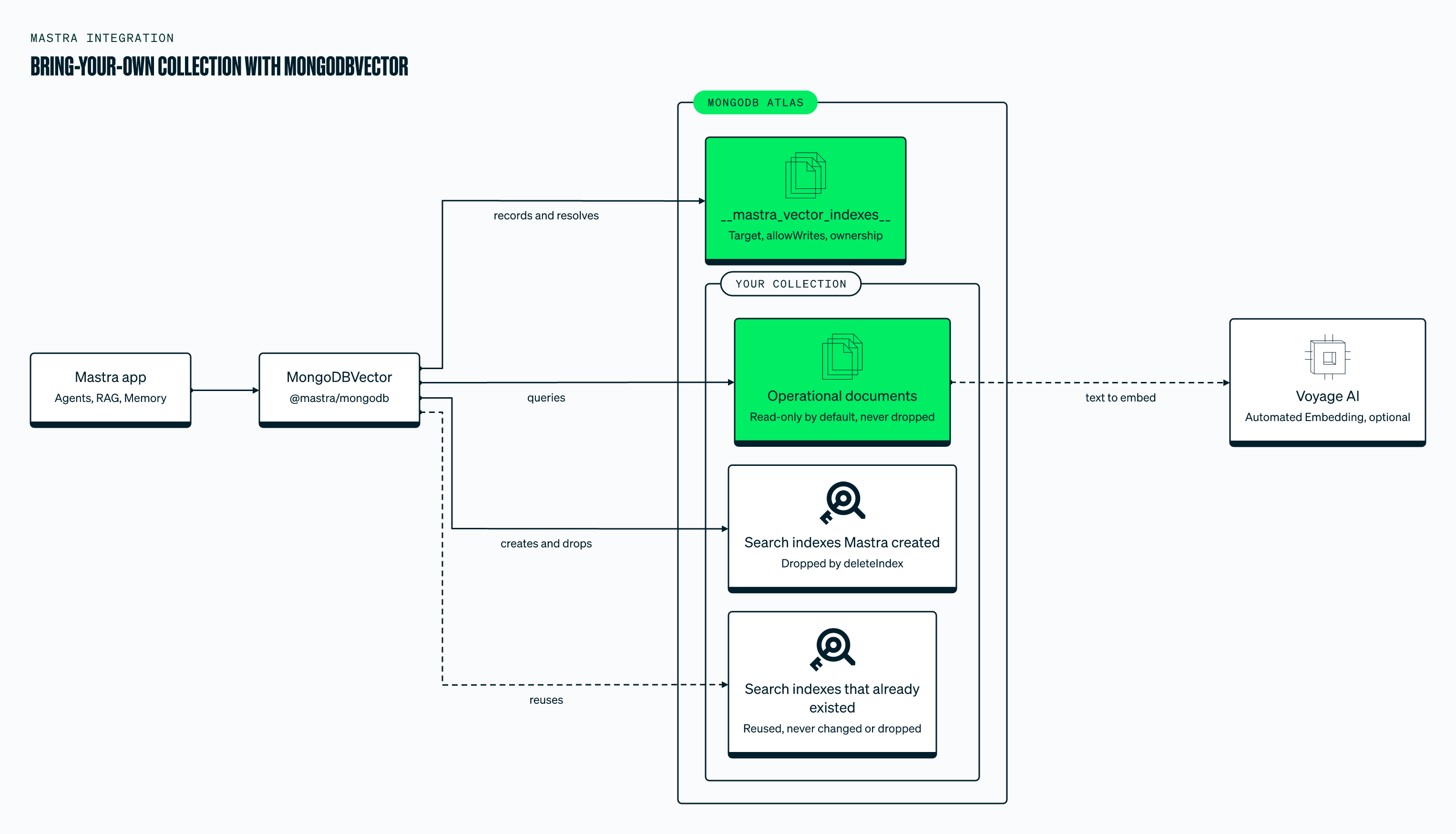
Text version of the diagram
Important notes:
- The collection must already exist and contain documents with an
embeddingfield (or the customembeddingFieldPathyou configured) - The collection is never created or dropped when using
collectionName - A BYO index is read-only.
upsert(),updateVector(),deleteVector(), anddeleteVectors()throw a clear error rather than mutating caller-owned operational documents. Write embeddings into the same documents from your application, or useautoEmbedand let MongoDB generate them. The deprecatedallowWrites: trueoption still lets the store write. Entries written by older versions without the flag are treated as read-only (fail closed). - Use
metadataMode: 'document'when querying to retrieve the full source document asmetadata - In
'document'mode the embedding is omitted frommetadataby default; passincludeVector: trueto retain it (and also expose it as a top-levelvector) - Filtering in
'document'mode operates on root document fields, not a nestedmetadata.subdocument.filter: { lane: 'fraud' }matches the top-levellanefield of your operational documents (in the default'field'mode, bare fields are rewritten tometadata.<field>for managed collections). Both the pushdown and$matchfallback paths honor this. - Native
ObjectId_ids are supported. Operational collections commonly key onObjectId; query results coerce_idto a string (theQueryResult.idcontract), anddeleteVector()/updateVector()/deleteVectors()accept that string and match the underlyingObjectIddocument. Managed collections (string_ids) are unaffected. - Full-text and hybrid search on a BYO collection are opt-in: no full-text index is auto-created, so call
createSearchIndex()beforetextQuery()/hybridQuery(). The full-text index builds asynchronously. CallwaitForSearchIndexReady()(or passwaitUntilReady: true) before an immediate text/hybrid query. deleteIndex()on a BYO index drops the vector and text indexes Mastra created but preserves the collection, its documents, and any search index that existed before- To filter in
'document'mode without loading candidate_ids, declare the root fields you filter on:createIndex({ ..., filterFields: ['lane'] })
allowWrites is deprecated and will be removed in the next major version. With allowWrites: true, deleteVector() and deleteVectors() delete your original documents, not only their embeddings, and upsert() replaces each document's metadata field. The setting is stored with the index, so it applies to every process that uses that index name.
allowWrites is a guard in Mastra, not database access control. It doesn't limit the MongoDB user, and it doesn't stop createIndex(), createSearchIndex(), or deleteIndex() from managing search indexes and the __mastra_vector_indexes__ registry. To enforce read-only access, connect with a MongoDB role that can only read the collection, and use a separate user to create indexes.
Best practicesDirect link to Best practices
- Index metadata fields used in filters for optimal query performance.
- Use consistent field naming in metadata to avoid unexpected query results.
- Monitor index and collection statistics to ensure efficient search.
- When indexing existing collections, ensure all documents have the required
embeddingfield.
Usage exampleDirect link to Usage example
Vector embeddings with MongoDBDirect link to vector-embeddings-with-mongodb
Embeddings are numeric vectors used by memory's semanticRecall to retrieve related messages by meaning (not keywords).
MongoDB Vector Search is recommended for production use. For self-hosted deployments, Vector Search is available with local Atlas deployments via the Atlas CLI.
This setup uses FastEmbed, a local embedding model, to generate vector embeddings.
To use this, install @mastra/fastembed:
- npm
- pnpm
- Yarn
- Bun
npm install @mastra/fastembed@latest
pnpm add @mastra/fastembed@latest
yarn add @mastra/fastembed@latest
bun add @mastra/fastembed@latest
Add the following to your agent:
import { Memory } from '@mastra/memory'
import { Agent } from '@mastra/core/agent'
import { MongoDBStore, MongoDBVector } from '@mastra/mongodb'
import { fastembed } from '@mastra/fastembed'

export const mongodbAgent = new Agent({
  id: 'mongodb-agent',
  name: 'mongodb-agent',
  instructions:
    'You are an AI agent with the ability to automatically recall memories from previous interactions.',
  model: 'openai/gpt-6.1-sol',
  memory: new Memory({
    storage: new MongoDBStore({
      id: 'mongodb-storage',
      uri: process.env.MONGODB_URI!,
      dbName: process.env.MONGODB_DB_NAME!,
    }),
    vector: new MongoDBVector({
      id: 'mongodb-vector',
      uri: process.env.MONGODB_URI!,
      dbName: process.env.MONGODB_DB_NAME!,
    }),
    embedder: fastembed,
    options: {
      lastMessages: 10,
      semanticRecall: {
        topK: 3,
        messageRange: 2,
      },
      generateTitle: true, // generates descriptive thread titles automatically
    },
  }),
})
Vector embeddings with VoyageAIDirect link to Vector embeddings with VoyageAI
VoyageAI provides specialized embedding models optimized for retrieval tasks. VoyageAI is also integrated with MongoDB Atlas for multimodal embeddings.
- npm
- pnpm
- Yarn
- Bun
npm install @mastra/voyageai@latest
pnpm add @mastra/voyageai@latest
yarn add @mastra/voyageai@latest
bun add @mastra/voyageai@latest
Basic usage example:
import { Memory } from '@mastra/memory'
import { Agent } from '@mastra/core/agent'
import { MongoDBStore, MongoDBVector } from '@mastra/mongodb'
import { voyage } from '@mastra/voyageai'

export const mongodbVoyageAgent = new Agent({
  id: 'mongodb-voyage-agent',
  name: 'MongoDB VoyageAI Agent',
  instructions: 'You are an AI agent with semantic recall powered by VoyageAI and MongoDB.',
  model: 'openai/gpt-6.1-sol',
  memory: new Memory({
    storage: new MongoDBStore({
      id: 'mongodb-storage',
      uri: process.env.MONGODB_URI!,
      dbName: process.env.MONGODB_DB_NAME!,
    }),
    vector: new MongoDBVector({
      id: 'mongodb-vector',
      uri: process.env.MONGODB_URI!,
      dbName: process.env.MONGODB_DB_NAME!,
    }),
    embedder: voyage, // VoyageAI's default model (voyage-3.5, 1024 dimensions)
    options: {
      lastMessages: 10,
      semanticRecall: {
        topK: 5,
        messageRange: 2,
      },
    },
  }),
})
For detailed VoyageAI embedding examples including specialized models, multimodal embeddings, and retrieval optimization, see the VoyageAI embeddings documentation.