What is Mastra?
Mastra is an open-source TypeScript framework for building AI applications and autonomous AI systems. Use it for anything from an AI feature inside an existing product to long-running agents that run entire processes on their own, such as a software factory that plans, builds, reviews, and ships code.
Mastra gives you everything you need to build an agent harness out of the box. It's built on established patterns, so you make fewer integration decisions and spend more time on your product. And, as you'd expect from an AI framework, it includes a skill and CLI that help your coding agent write accurate, up-to-date Mastra code.
Run Mastra standalone or inside your existing web server, and call your agents from your own code, over HTTP using the Mastra client, or from channels (for example, Slack).
A quick tour of the Mastra platform shows how the pieces fit together.
FrameworkDirect link to Framework
Mastra is batteries-included, but not all-or-nothing. A single agent can start small:
import { Agent } from '@mastra/core/agent'
import { searchDocs } from '../tools/search-docs'

export const supportAgent = new Agent({
  id: 'support-agent',
  name: 'Support Agent',
  instructions: 'Answer customer support questions clearly.',
  model: 'openai/gpt-5.6-sol',
  tools: { searchDocs },
})
Then add the capabilities your agent needs:
- Act in real environments: Use workspaces so agents can read and write files, run commands, and work inside a sandbox.
- Bring the right context: Use tools, memory, skills, and domain knowledge so agents remember what matters and stay within the context window.
- Coordinate complex work: Run typed workflows, tasks, and subagents when work needs multiple steps or parallel execution.
- Control the agent loop: Suspend for human approval, steer an in-flight loop with signals, or queue input for the next turn.
- Meet users where they work: Connect agents to Slack, Discord, GitHub, and other channels.
- Manage risk and cost: Configure authentication, multi-tenant isolation, and guardrails, including
CostGuardProcessor.
See the left-hand sidebar for the full menu of features.
StudioDirect link to Studio
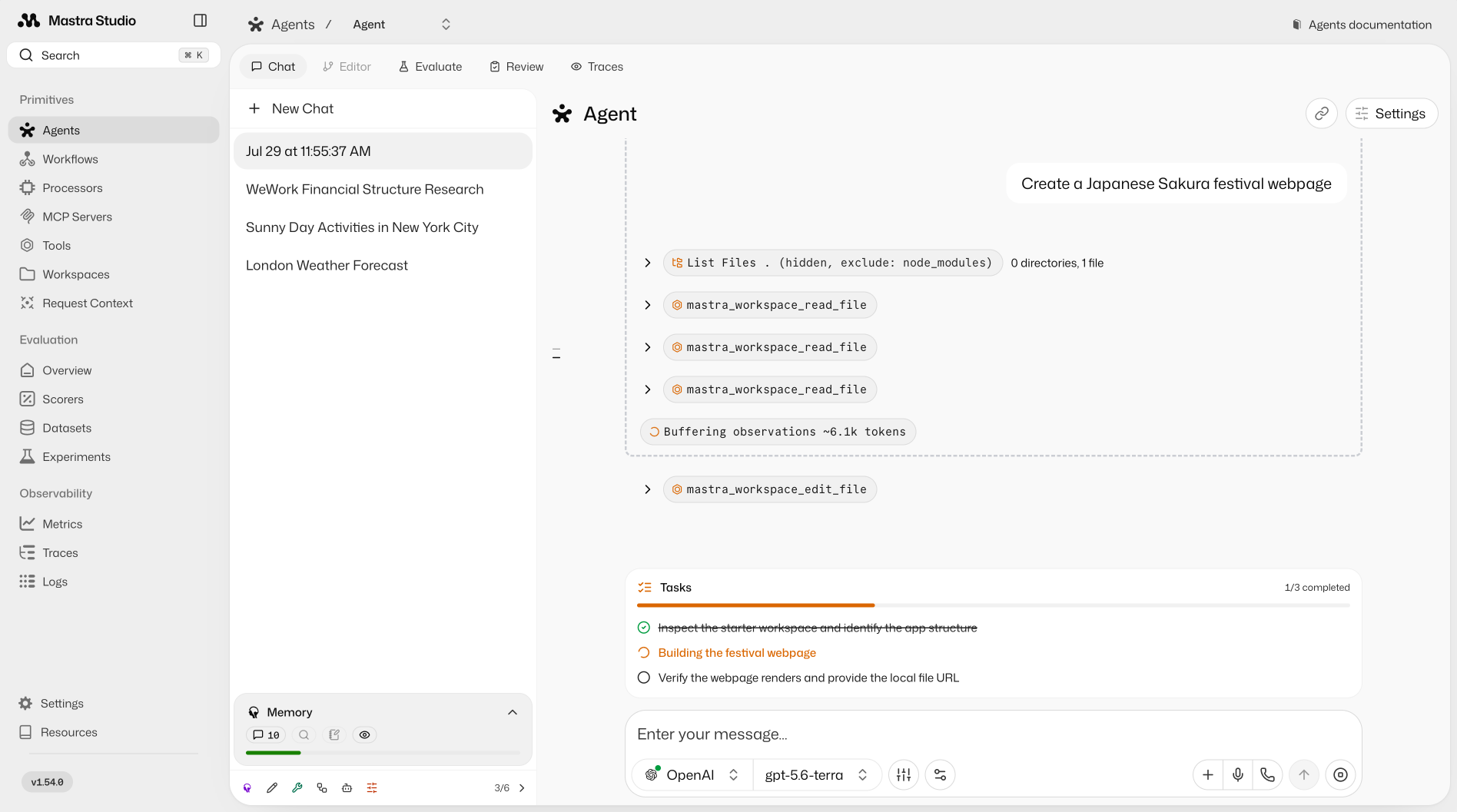
Studio is usually the first place you go after creating a Mastra app. It gives you a live environment for testing agents, inspecting runs, and iterating quickly.
Studio isn't just for engineers. Deploy it and share it with your team, so collaborators can try an agent before it ships. With the Editor and Agent Builder, non-technical teammates can create and iterate on agents themselves, with every change versioned in code.
Observability and evalsDirect link to Observability and evals
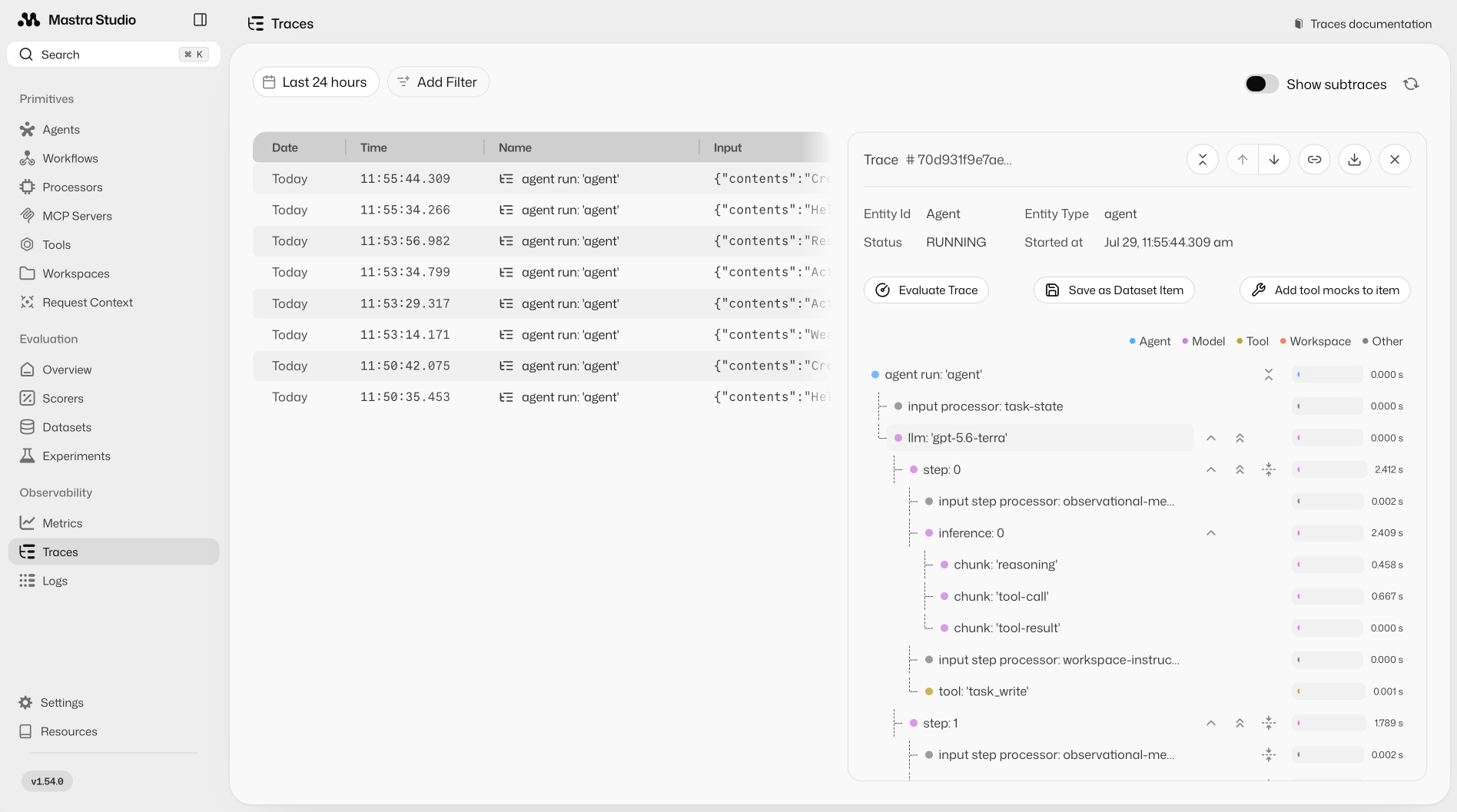
Mastra has built-in logs, traces, and metrics, so you can understand every run in development and production. See Observability.
Evals close the loop. Score outputs with rule-based or LLM-as-judge scorers, live in production or offline in CI. Create datasets from real traces, run experiments, and compare versions. Because you own the code and the observability layer, you get a closed loop from trace to prompt edit to measurable improvement.
Long-running agentsDirect link to Long-running agents
Some agents finish in a single request. Others run for hours or days, like a sales agent that watches for signups or an SRE agent that handles incidents. Mastra supports long-running agents with these capabilities:
- Survive restarts and disconnects: Durable agents persist run state so work resumes and clients reconnect.
- Wake and steer agents mid-run: Send messages and signals to wake an agent, add context, or queue input.
- Keep working toward a goal: Goals persist an objective until it's met or the run budget is spent.
- Run work outside the request: Use schedules and background tasks for recurring jobs, slow tools, and work that shouldn't block the agent loop.
For long-running interactive applications, AgentController manages threads, modes, tool approvals, and model switching. It powers Mastra Code and lets you build a Claude Code-style experience for your own domain.
DeploymentDirect link to Deployment
Mastra is open source and infrastructure-neutral. The framework fits your stack instead of requiring your stack to fit one vendor. Choose from an ecosystem of model providers, databases, sandboxes, and observability platforms, and change providers without rewriting your application around proprietary infrastructure.
When you're ready to deploy:
- Mastra Server: The quickest path to production. Mastra builds and hosts your application as an API server with a stable endpoint, environment variables, custom domains, and deploy history.
- Your infrastructure: Use Mastra's deployers for major platforms, deploy a standard server to your preferred virtual machine, container, or platform as a service, or run Mastra inside an existing TypeScript application with a server adapter.
Use casesDirect link to Use cases
Here are some of the ways you can use Mastra:
Embed agents in your product
Customer-facing assistants
Build agents that handle inquiries, schedule appointments, send reminders, and answer questions via chat, WhatsApp, or voice.
Templates: Docs Chatbot, Slack Agent
Internal copilots
Help employees work faster with AI that understands your domain—HR queries, clinical documentation, sales prep, or document generation.
Used by Factorial, Counsel Health, Cedar, SoftBank
Templates: Chat with PDF, Google Sheet Analysis
Data analysis agents
Let users query databases and dashboards in natural language. Connect to your data sources and return answers, charts, or reports.
Used by Index, PLAID Japan
Templates: Chat with Database, CSV to Questions
Content automation
Generate, transform, and manage structured content at scale—whether for a CMS, knowledge base, or documentation system.
Used by Sanity
Templates: Chat with YouTube, Flash Cards from PDF
DevOps & engineering automation
Automate deployments, debug production issues, manage infrastructure, and handle on-call workflows.
Used by StarSling
Templates: GitHub PR Code Review, Browser Agent
Sales & GTM workflows
Turn customer conversations into structured tasks, generate investment memos, or automate outreach sequences.
Used by Kestral, Orange Collective, WorkOS
Templates: Customer Feedback Summarization
Browse templates for working examples.