Memory
Memory gives your agent access to earlier messages and tool results. The agent can use this context to answer follow-up questions and recall information from previous interactions.
Mastra agents can be configured to store message history. Additionally, you can enable:
- Observational Memory (Recommended): Uses background agents to maintain a dense observation log that replaces raw message history as it grows. This keeps the context window small while preserving long-term memory.
- Working memory: Stores persistent, structured user data such as names, preferences, and goals.
- Semantic recall: Retrieves relevant past messages based on semantic meaning rather than exact keywords.
- Multi-user threads: Share one thread between multiple users.
If the combined memory exceeds the model's context limit, memory processors can filter, trim, or prioritize content so the most relevant information is preserved.
Memory results will be stored in one or more of your configured storage providers.
Watch Mastra memory concepts for a conceptual overview of the memory layers agents can use.
When to use memoryDirect link to When to use memory
Use memory when your agent needs to maintain multi-turn conversations that reference prior exchanges or recall user preferences or facts from earlier in a session, or alternatively build context over time within a conversation thread. Skip memory for single-turn requests where each interaction is independent.
QuickstartDirect link to Quickstart
Install the
@mastra/memorypackage.- npm
- pnpm
- Yarn
- Bun
npm install @mastra/memory@latestpnpm add @mastra/memory@latestyarn add @mastra/memory@latestbun add @mastra/memory@latestMemory requires a storage provider to persist message history, including user messages and agent responses.
For the purposes of this quickstart, use
@mastra/libsql.- npm
- pnpm
- Yarn
- Bun
npm install @mastra/libsql@latestpnpm add @mastra/libsql@latestyarn add @mastra/libsql@latestbun add @mastra/libsql@latestFor more details on available providers and how storage works in Mastra, visit the storage documentation.
Add the storage provider to your main Mastra instance to enable memory across all configured agents.
src/mastra/index.tsimport { Mastra } from '@mastra/core'import { LibSQLStore } from '@mastra/libsql'export const mastra = new Mastra({storage: new LibSQLStore({id: 'mastra-storage',url: ':memory:',}),})Create a
Memoryinstance and pass it to the agent'smemoryoption.src/mastra/agents/memory-agent.tsimport { Agent } from '@mastra/core/agent'import { Memory } from '@mastra/memory'export const memoryAgent = new Agent({id: 'memory-agent',name: 'Memory Agent',memory: new Memory({options: {lastMessages: 20,},}),})Visit Memory Class for a full list of configuration options.
Call your agent, for example in Studio. Inside Studio, start a new chat with your agent and take a look at the right sidebar. It'll now display memory details.
Message historyDirect link to Message history
Pass a memory object with resource and thread to track message history.
resource: A stable identifier for the user or entity.thread: An ID that isolates a specific conversation or session.
const response = await memoryAgent.generate('Remember my favorite color is blue.', {
  memory: {
    resource: 'user-123',
    thread: 'conversation-123',
  },
})
To recall information stored in memory, call the agent with the same resource and thread values used in the original conversation.
const response = await memoryAgent.generate("What's my favorite color?", {
  memory: {
    resource: 'user-123',
    thread: 'conversation-123',
  },
})

// Response: "Your favorite color is blue."
Each thread has an owner (resourceId) that can't be changed after creation. Avoid reusing the same thread ID for threads with different owners, as this will cause errors when querying.
To list all threads for a resource, or retrieve a specific thread, use the memory API directly.
Identify memory with scopesDirect link to Identify memory with scopes
Instead of a memory object, you can pass scopes: the addresses a run acts as, written as <type>:<value>. Memory reads the resource from a resource: scope and the thread from a thread: scope. Other scopes, such as org:acme, are passed to tools and processors.
const response = await memoryAgent.generate('Remember my favorite color is blue.', {
  scopes: ['org:acme', 'resource:user-123', 'thread:conversation-123'],
})
Scopes can also come from the agent and from the request context. Mastra combines all three sources:
export const memoryAgent = new Agent({
  id: 'memory-agent',
  name: 'Memory Agent',
  scopes: ({ requestContext }) => {
    // Set by your auth middleware. Request bodies can fill unreserved keys.
    const orgId = requestContext.get('org-id')
    return orgId ? [`org:${orgId}`] : []
  },
  memory: new Memory(),
})
The resolver's inputs must come from the server, not the client: a request body can set any request context key that isn't reserved. Trusted server middleware can also set scopes directly with the MASTRA_SCOPES_KEY request context key. Visit Request Context for details. Clients can't send scopes in a request body.
You can mix scopes with memory.resource, memory.thread, or the resource and thread request context keys, as long as they agree. If a resource: or thread: scope names a different value than another source, the call throws an error.
Tools, processors, and subagents receive the run's other scopes, but not its resource: and thread: scopes. Each nested agent call picks its own resource and thread.
Observational MemoryDirect link to Observational Memory
Long conversations can fill the context window with raw message history and reduce agent performance. Observational Memory uses background agents to compress older messages into observations. This reduces the context used by message history while retaining information for later turns.
import { Agent } from '@mastra/core/agent'
import { Memory } from '@mastra/memory'

export const memoryAgent = new Agent({
  id: 'memory-agent',
  name: 'Memory Agent',
  memory: new Memory({
    options: {
      observationalMemory: true,
    },
  }),
})
See Observational Memory for details on how observations and reflections work, and the reference for all configuration options.
What the model seesDirect link to What the model sees
Memory adds context to the system messages or conversation messages sent to the model. Message history is enabled by default. Other memory features contribute context only when configured. The diagram shows where each feature adds its context, and the list below explains what it contributes:
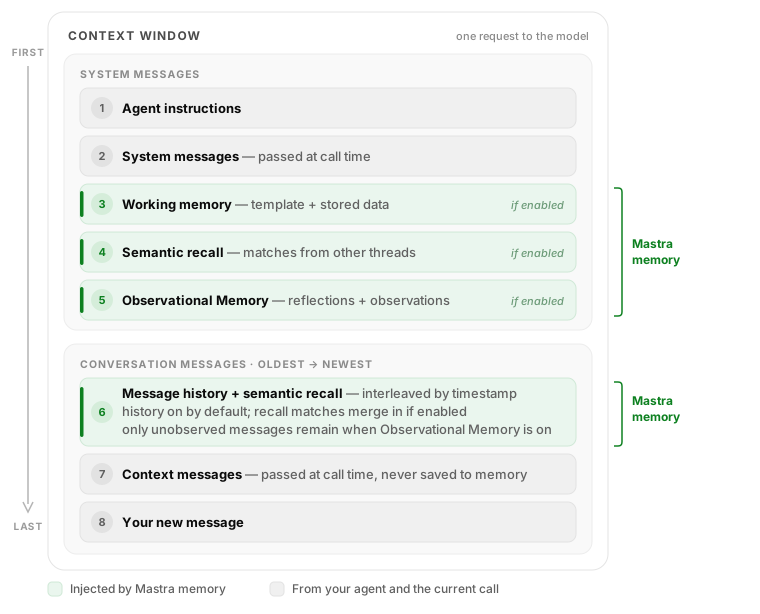
- Working memory is injected as a system message containing the template and the stored data. With
useStateSignals, it's delivered as a state signal instead. - Semantic recall matches from the current thread are inserted as regular messages and interleave with message history by timestamp. Matches from other threads are formatted into a system message instead.
- Message history adds the last N messages in chronological order. Your new message always comes last.
- Observational Memory replaces old raw history: reflections and observations live in a system message, and only messages that haven't been observed yet remain in the conversation. A short continuation reminder is placed at the start of the conversation messages.
- Context messages are the optional
contextarray passed on a call, for exampleagent.generate(msg, { context: [...] }). Use them for one-off background such as app state or your own RAG results. They appear as regular conversation messages for that request only and are never saved to memory.
Conversation messages are ordered by timestamp and deduplicated by message ID, so recalled older messages appear before recent history. Context messages passed at call time are stamped with the current time, which places them after history and recall but before your new message. To inspect the exact context for a real request, use Tracing and open the LLM call spans, see Observability below.
Memory in multi-agent systemsDirect link to Memory in multi-agent systems
When a supervisor agent delegates to a subagent, Mastra isolates subagent memory automatically. No flag enables this as it happens on every delegation. Understanding how this scoping works lets you decide what stays private and what to share intentionally.
How delegation scopes memoryDirect link to How delegation scopes memory
Each delegation creates a fresh threadId and a deterministic resourceId for the subagent:
- Thread ID: Unique per delegation. The subagent starts with a clean message history every time it's called.
- Resource ID: Derived as
{parentResourceId}-{agentName}. Because the resource ID is stable across delegations, resource-scoped memory persists between calls. A subagent remembers facts from previous delegations by the same user. - Memory instance: A subagent without its own memory inherits the supervisor's
Memoryinstance and all configured options. If the subagent defines its own, that takes precedence.
Title generation (generateTitle) is a top-level thread concern and isn't applied to inherited subagent threads. Because each delegation creates an ephemeral thread that no one sees, running title generation for it would waste an LLM call per delegation. To generate titles for a subagent's own threads, give that subagent its own memory configuration.
The supervisor forwards its conversation context to the subagent so it has enough background to complete the task. Only the delegation prompt and the subagent's response are saved. The full parent conversation isn't stored. You can control which messages reach the subagent with the messageFilter callback.
Subagent resource IDs are always suffixed with the agent name ({parentResourceId}-{agentName}). Different subagents under the same supervisor never share a resource ID through delegation.
To go beyond this default isolation, you can share memory between agents by passing matching identifiers when you call them directly.
Share memory between agentsDirect link to Share memory between agents
When you call agents directly (outside the delegation flow), memory sharing is controlled by two identifiers: resourceId and threadId. Agents that use the same values read and write to the same data. This is useful when agents collaborate on a shared context, for example, a researcher that saves notes and a writer that reads them.
Resource-scoped sharing is the most common pattern. Working memory and semantic recall default to scope: 'resource'. If two agents share a resourceId, they share working memory and embeddings, even across different threads:
// Both agents share the same resource-scoped memory
await researcher.generate('Find information about quantum computing.', {
  memory: { resource: 'project-42', thread: 'research-session' },
})

await writer.generate('Write a summary from the research notes.', {
  memory: { resource: 'project-42', thread: 'writing-session' },
})
Because both calls use resource: 'project-42', the writer can access the researcher's working memory. Semantic embeddings are also shared through the resource. Each agent still has its own thread, so message histories stay separate.
Thread-scoped sharing gives tighter coupling. Observational Memory uses scope: 'thread' by default. If two agents use the same resource and thread, they share the full message history. Each agent sees every message the other has written. This is useful when agents need to build on each other's exact outputs.
ObservabilityDirect link to Observability
Enable Tracing to monitor and debug memory in action. Traces show you exactly which messages and observations the agent included in its context for each request, helping you understand agent behavior and verify that memory retrieval is working as expected.
Open Studio and select the Observability tab in the sidebar. Open the trace of a recent agent request and look for its LLM call spans.
Switch memory per requestDirect link to Switch memory per request
Use RequestContext to access request-specific values. This lets you conditionally select different memory or storage configurations based on the context of the request.
export type UserTier = {
  'user-tier': 'enterprise' | 'pro'
}

const premiumMemory = new Memory()
const standardMemory = new Memory()

export const memoryAgent = new Agent({
  id: 'memory-agent',
  name: 'Memory Agent',
  memory: ({ requestContext }) => {
    const userTier = requestContext.get('user-tier') as UserTier['user-tier']

    return userTier === 'enterprise' ? premiumMemory : standardMemory
  },
})
Visit Request Context for more information.
RelatedDirect link to Related
Memoryreference- Tracing
- Request Context
- Mastra Code: A coding agent using Mastra's memory system