Observational Memory
Added in: @mastra/memory@1.1.0
Observational Memory (OM) is Mastra's memory system for long-context agentic memory. Background agents, an Observer and a Reflector, watch your agent's conversations and maintain a dense observation log that replaces raw message history as it grows.
QuickstartDirect link to Quickstart
Ensure you have @mastra/memory installed in your project. Set observationalMemory: true in your Memory config to enable Observational Memory.
import { Memory } from '@mastra/memory'
import { Agent } from '@mastra/core/agent'

export const agent = new Agent({
  id: 'my-agent',
  name: 'my-agent',
  instructions: 'You are a helpful assistant.',
  model: 'openai/gpt-5-mini',
  memory: new Memory({
    options: {
      observationalMemory: true,
    },
  }),
})
The agent now has humanlike long-term memory that persists across conversations. Setting observationalMemory: true uses automatic model selection. To use a specific model, pass it in the config object:
const memory = new Memory({
  options: {
    observationalMemory: {
      model: 'deepseek/deepseek-reasoner',
    },
  },
})
See configuration options for full API details.
When you use OM with a client application, send only the new message from the client instead of the full conversation history.
Observational memory still relies on stored conversation history. Sending the full history is redundant and can cause message ordering bugs when client-side timestamps conflict with stored timestamps. Mastra filters client-echoed history before loading stored messages and uses the stored copy as the base when message IDs match, preserving stored timestamps and provider metadata while retaining new tool results.
If you assemble the request input yourself and need it processed exactly as sent, set retainFullInput: true on memory.options for that call, or in the memory constructor options to apply it agent-wide. This disables that filtering. History still loads underneath. Every input message that isn't already stored is saved to the thread, including few-shot examples.
For an AI SDK example, see Using Mastra Memory.
OM currently only supports @mastra/pg, @mastra/libsql, @mastra/mysql, @mastra/mongodb, @mastra/convex, and @mastra/oracledb storage adapters.
It uses background agents for managing memory. When no model is set, the default is model: 'auto'.
Automatic models in Mastra Code and FactoryDirect link to Automatic models in Mastra Code and Factory
Mastra Code and Factory surface the same automatic selection as a per-role Auto option in their settings.
An automatic Observer or Reflector follows the active main model provider. Mastra Code uses that provider's built-in low-cost Observational Memory model when one is configured. For custom providers and providers without a built-in choice, it uses the active main model. The effective model is resolved when the role runs, so changing the main model doesn't rewrite the saved automatic selection.
Select an explicit model to pin one role independently. Reset that role to Auto to resume following the main model provider. Existing saved concrete model IDs remain explicit until you reset them.
Factory stores automatic intent separately from the effective model shown in settings. A missing provider credential can mark that effective model unavailable, but it doesn't replace the saved selection or prevent Factory from starting.
Temporal gap markersDirect link to Temporal gap markers
Temporal gap markers insert a short reminder before a new user message when enough time has passed since the previous message in the thread. They help the agent and the UI see that the conversation resumed after a useful pause.
Temporal gap markers are off by default. Enable them with temporalMarkers: true in the observationalMemory config:
import { Memory } from '@mastra/memory'
import { Agent } from '@mastra/core/agent'

export const agent = new Agent({
  id: 'my-agent',
  name: 'my-agent',
  instructions: 'You are a helpful assistant.',
  model: 'openai/gpt-5-mini',
  memory: new Memory({
    options: {
      observationalMemory: {
        model: 'google/gemini-2.5-flash',
        temporalMarkers: true,
      },
    },
  }),
})
Mastra inserts a temporal gap marker when the gap is at least 10 minutes. The marker is stored in memory and also emitted as a transient reminder event, so clients can render it as a lightweight timeline hint.
The observer also sees these markers when it processes the thread. The observations it writes can anchor memories to when they happened (for example, "User asked about deployment after a 2-day gap").
See the API reference for the full configuration shape.
Early activationDirect link to Early activation
OM can activate buffered observations before the token threshold is reached. This is useful when a prompt cache is likely to expire, or when the agent changes model providers.
Top-level early activation settings apply to observations by default:
const memory = new Memory({
  options: {
    observationalMemory: {
      model: 'google/gemini-2.5-flash',
      activateAfterIdle: 'auto',
      activateOnProviderChange: true,
    },
  },
})
Use nested observation and reflection settings for per-phase control. Reflection early activation is opt-in, so top-level settings affect only observations.
const memory = new Memory({
  options: {
    observationalMemory: {
      model: 'google/gemini-2.5-flash',
      activateAfterIdle: '5m',
      observation: {
        activateAfterIdle: false,
      },
      reflection: {
        activateAfterIdle: '10m',
        activateOnProviderChange: true,
      },
    },
  },
})
In this example, the top-level idle setting is disabled for observations, while reflections opt into idle and provider-change activation.
Buffer on idleDirect link to Buffer on idle
Set observation.bufferOnIdle to true to run background observation buffering when an agent turn ends and the agent becomes idle. This is useful for apps that want short turns to be observed without waiting for the next turn or the messageTokens threshold.
const memory = new Memory({
  options: {
    observationalMemory: {
      model: 'openai/gpt-5-mini',
      observation: {
        bufferOnIdle: true,
      },
    },
  },
})
bufferOnIdle is off by default. It's separate from bufferTokens: bufferTokens controls step-time async buffering, while bufferOnIdle controls end-of-turn buffering for idle turns.
Retries and failure policyDirect link to Retries and failure policy
Observer and Reflector model calls are retried on transient provider errors, and a turn aborts if they still fail. Each stage is controlled independently by:
maxRetries: retries after the initial model call (default8).failurePolicy: what happens once retries are exhausted, either'abort'(default) or'continue'.
const memory = new Memory({
  options: {
    observationalMemory: {
      observation: {
        maxRetries: 8,
        failurePolicy: 'continue',
      },
      reflection: {
        maxRetries: 8,
        failurePolicy: 'continue',
      },
    },
  },
})
maxRetries governs OM's own retry ladder; the underlying model call is configured with no provider-level retries, so the option is the single retry knob for the stage.
With failurePolicy: 'continue', Mastra retries as configured, reports the failure through the existing OM diagnostics, keeps the failed input pending for a later cycle, and lets the main agent turn continue. It doesn't advance observation boundaries or discard unobserved messages. A Reflector failure under 'continue' leaves any already-persisted observations committed and defers reflection to the next threshold crossing.
A provider outage usually takes out both stages, so set the policy on both if you want the turn to survive one.
This policy applies only to Observer and Reflector model and provider failures in synchronous, resource-scoped, and buffered observation. Persistence, indexing, transform, locking, invariant, and explicit abort failures remain fatal. It doesn't prevent the underlying provider or network error, change blockAfter, or change attachment handling.
'continue' has no backstop for a sustained outage. Unobserved messages stay pending and keep accruing in the main
agent's context. A long outage moves the failure from the memory layer to the model's context limit.
See the API reference for the full configuration shape.
BenefitsDirect link to Benefits
- Prompt caching: OM's context is stable and observations append over time rather than being retrieved at runtime each turn. This keeps the prompt prefix cacheable, which reduces costs.
- Compression: Raw message history and tool results get compressed into a dense observation log. Smaller context means faster responses and longer coherent conversations.
- Zero context rot: The agent sees relevant information instead of noisy tool calls and irrelevant tokens, which keeps the agent on task over long sessions.
How it worksDirect link to How it works
You don't remember every word of every conversation you've ever had. You observe what happened subconsciously, then your brain reflects, reorganizing, combining, and condensing into long-term memory. OM works the same way.
Every time an agent responds, it sees a context window containing its system prompt, recent message history, and any injected context. The context window is finite. Even models with large token limits perform worse when the window is full. This causes two problems:
- Context rot: the more raw message history an agent carries, the worse it performs.
- Context waste: most of that history contains tokens no longer needed to keep the agent on task.
OM solves both problems by compressing old context into dense observations.
ObservationsDirect link to Observations
When message history tokens exceed a threshold (default: 30,000), the Observer creates observations which are concise notes about what happened:
OM uses fast local token estimation for this thresholding work. Text is estimated with tokenx, while image parts use provider-aware heuristics so multimodal conversations still trigger observation at the right time. The same applies to image-like file parts when a transport normalizes an uploaded image as a file instead of an image part. For example, OpenAI image detail settings can materially change when OM decides to observe.
The Observer can also see attachments in the history it reviews. For readability, OM keeps placeholders such as [Image #1: reference-board.png] or [File #1: floorplan.pdf] in the transcript while forwarding the actual attachments beside the text. When possible, image-like file parts become image inputs for the Observer. Other attachments remain file parts and use normalized token counting. This applies to both normal thread observation and batched resource-scope observation.
ExtractorsDirect link to Extractors
Use extractors when you want OM to persist specific values alongside observations. Built-in values use the same extraction pipeline as custom values. They include current task and suggested response, along with thread title.
The following example extracts a compact user profile from observations:
import { Agent } from '@mastra/core/agent'
import { Extractor, Memory } from '@mastra/memory'
import { z } from 'zod'

const memory = new Memory({
  options: {
    observationalMemory: {
      model: 'openai/gpt-5-mini',
      observation: {
        extract: [
          new Extractor({
            name: 'User profile',
            instructions: 'Extract stable user profile facts that should be remembered.',
            schema: z.object({
              preferredName: z.string().optional(),
              timezone: z.string().optional(),
              tools: z.array(z.string()).optional(),
            }),
          }),
        ],
      },
    },
  },
})

export const agent = new Agent({
  id: 'assistant',
  name: 'assistant',
  instructions: 'You are a helpful assistant.',
  model: 'openai/gpt-5-mini',
  memory,
})
Adding a schema makes the extractor run as a follow-up structured output request. Schema-less extractors are inline string extractors emitted directly in the Observer or Reflector response.
new Extractor({
  name: 'Mood',
  instructions: 'Extract the user mood as a short phrase.',
})
By default, OM shows the last extracted value to the extractor on later runs. Set includePreviousExtraction: false when the Observer shouldn't see the previous value.
new Extractor({
  name: 'Latest blocker',
  instructions: 'Extract any blockers the agent is running into.',
  includePreviousExtraction: false,
})
Use runtime instructions or schema functions when an extractor needs runtime context, such as the active memory instance or request context:
new Extractor({
  name: 'Workspace summary',
  instructions: ({ memory }) =>
    memory ? 'Extract workspace facts for this memory instance.' : 'Extract workspace facts.',
})
Read extracted values from a streamDirect link to Read extracted values from a stream
Extractor results are emitted when OM completes an observation or reflection. Read both completion data parts from the stream:
const stream = await agent.stream('Remember that I prefer dark mode.')

for await (const chunk of stream.fullStream) {
  if (chunk.type === 'data-om-observation-end' || chunk.type === 'data-om-buffering-end') {
    const { operationType, extractedValues = {}, extractionFailures = [] } = chunk.data

    for (const [slug, value] of Object.entries(extractedValues)) {
      console.log(`${operationType} extractor ${slug}:`, value)
    }

    for (const failure of extractionFailures) {
      console.error(`Extractor ${failure.slug} failed:`, failure.error)
    }
  }
}
extractedValues uses each extractor's slug as its key. Both result fields are optional, and a failed extractor doesn't remove values from successful extractors.
data-om-observation-end reports a synchronous completion. data-om-buffering-end reports completed background work. Its extractor metadata is persisted immediately, but the buffered content remains inactive until activation. Check operationType to determine whether the completed work was an observation or reflection.
See the data-om-observation-end and data-om-buffering-end reference tables for the complete payloads.
Working memory updatesDirect link to Working memory updates
Use observationalMemory.observation.manageWorkingMemory to let the Observer manage working memory automatically. The main agent no longer needs to call the working memory tool while it handles the user request, so working memory updates don't depend on the agent remembering to make them.
This also keeps working memory prompt-cache friendly. Working memory normally lives in the system prompt, so updates can invalidate the prompt cache. OM-managed working memory defaults workingMemory.useStateSignals to true, which moves working memory into state signals instead.
import { Memory } from '@mastra/memory'

const memory = new Memory({
  options: {
    workingMemory: {
      enabled: true,
    },
    observationalMemory: {
      enabled: true,
      observation: {
        manageWorkingMemory: true,
      },
    },
  },
})
This setting adds WorkingMemoryExtractor, defaults workingMemory.agentManaged to false, and defaults workingMemory.useStateSignals to true. Set workingMemory.agentManaged: true if the main agent should still receive working memory tool and instruction injection.
Use onExtracted to normalize or react to custom extracted values before they're persisted:
new Extractor({
  name: 'Project status',
  instructions: 'Extract the current project status.',
  schema: z.string(),
  async onExtracted({ current, sendSignal }) {
    await sendSignal?.({
      type: 'user-message',
      contents: `Project status extracted: ${current}`,
    })
    return current.trim().toLowerCase()
  },
})
Extractor failures are reported in OM markers and don't block other successful extractor values. See the API reference for the full Extractor shape.
If your Observer model is text-only or its API rejects multimodal input, set observation.observeAttachments to false to drop attachments before they reach the Observer. The readable placeholders ([Image #1: ...], [File #1: ...]) are kept in the transcript so the Observer can still reason about what was shared without receiving the binary payload. The same filter applies to tool results that contain image or file parts:
new Agent({
  id: 'assistant',
  name: 'assistant',
  instructions: 'You are a helpful assistant.',
  model: 'openai/gpt-5-mini',
  memory: new Memory({
    options: {
      observationalMemory: {
        observation: {
          model: 'deepseek/deepseek-reasoner',
          observeAttachments: false,
        },
      },
    },
  }),
})
You can also pass an allowlist of mimeType globs (for example ['image/*']) to forward only the kinds the Observer can handle. Alternatively, set observeAttachments: 'auto' so Mastra consults the provider capabilities registry. It forwards attachments when the Observer model supports multimodal input and drops them otherwise. If capability data is unavailable for the model, the setting falls back to true.
Attachments that the agent recorded as unavailable, because they could no longer be downloaded, are never sent to the Observer. The Observer still sees their [Image #1: ...] or [File #1: ...] line. See attachment download failures for how Mastra records them.
Date: 2026-01-15

- 🔴 12:10 User is building a Next.js app with Supabase auth, due in 1 week (meaning January 22nd 2026)
  - 🔴 12:10 App uses server components with client-side hydration
  - 🟡 12:12 User asked about middleware configuration for protected routes
  - 🔴 12:15 User stated the app name is "Acme Dashboard"
The compression is typically between 5x and 40x. During synchronous observation, the Observer can also track a current task and suggested response so the agent picks up where it left off.
If you enable observation.threadTitle, the Observer can also suggest a short thread title when the conversation topic meaningfully changes. Thread title generation is opt-in and updates the thread metadata, so apps like Mastra Code can show the latest title in thread lists and status UI.
Example: An agent using Playwright MCP might see 50,000+ tokens per page snapshot. With OM, the Observer watches the interaction and creates a few hundred tokens of observations about what was on the page and what actions were taken. The agent stays on task without carrying every raw snapshot.
ReflectionsDirect link to Reflections
When observations exceed their threshold (default: 40,000 tokens), the Reflector condenses them and combines related items, plus reflects on patterns.
Reflections don't accumulate as a separate, ever-growing layer. Each reflection rewrites the entire observation log. The Reflector's output becomes the new log, and new observations append after it. When the log next hits the threshold, the Reflector re-processes everything, including earlier reflections. It condenses older information more aggressively while keeping recent detail. Memory stays bounded around the reflection threshold no matter how long the conversation runs.
The result is a three-tier system:
- Recent messages: Exact conversation history for the current task
- Observations: A log of what the Observer has seen
- Reflections: Condensed observations when memory becomes too long
How context changes over timeDirect link to How context changes over time
With default settings, the context window doesn't grow unbounded. It oscillates through an observe-and-shrink cycle:
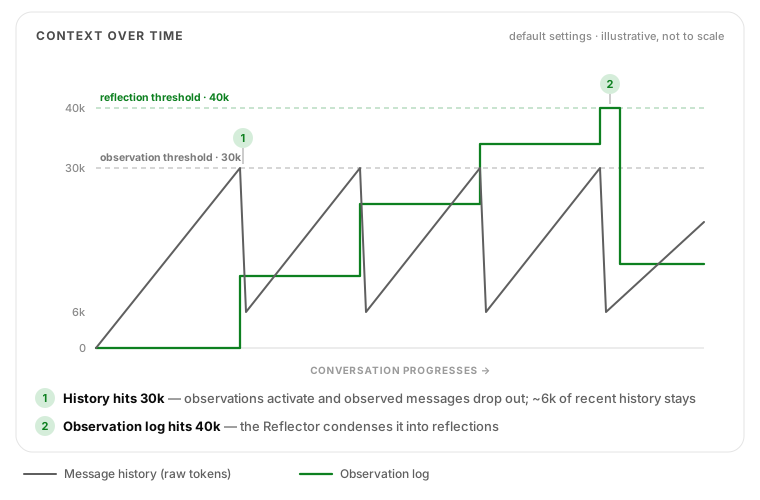
- 0 → 30k tokens: Message history grows normally. In the background, the Observer buffers observations every ~6k tokens (
bufferTokens: 0.2). - 30k reached: Buffered observations activate instantly. Observed messages are removed from the context window and only ~6k tokens of recent history remain (
bufferActivation: 0.8retains 20% of the threshold). The ~24k tokens of removed messages become roughly 1-5k tokens of observations at typical 5-40x compression. - Repeat: History grows from ~6k back toward 30k and shrinks again. Each cycle appends to the observation log, which grows much more slowly than raw history.
- Observations reach 40k: The Reflector creates a smaller log from the current observations and any earlier reflections.
In the normal buffered cycle, raw history oscillates between roughly 6k and 30k tokens. The observation log stays around 40k tokens, however long the conversation runs. These are activation thresholds rather than hard caps, so history can grow past the threshold whenever background buffering doesn't keep pace. Above blockAfter (default 1.2, ~36k tokens) activation is allowed to overshoot the retention target instead of activating fewer chunks. It doesn't drain the buffer, and with the default settings it removes the same amount of history as below the threshold. Reflection falls back to a synchronous run above its own blockAfter (~48k tokens).
With shareTokenBudget enabled, the two budgets pool together. While the observation log is small, message history can expand into the unused observation space (up to ~70k tokens with the defaults) before observation triggers. It then shrinks as observations accumulate.
Retrieval modeDirect link to Retrieval mode
Normal OM compresses messages into observations, which is great for staying on task, but the original wording is gone. Retrieval mode fixes this by keeping each observation group linked to the raw messages that produced it. The agent can call a recall tool to recover source details compressed by the summary, including exact wording and tool output as well as chronology.
Browsing onlyDirect link to Browsing only
Set retrieval: true to enable the recall tool for browsing raw messages. No vector store needed. By default, the recall tool can browse across all threads for the current resource.
const memory = new Memory({
  options: {
    observationalMemory: {
      model: 'google/gemini-2.5-flash',
      retrieval: true,
    },
  },
})
With semantic searchDirect link to With semantic search
Set retrieval: { vector: true } to also enable semantic search. This reuses the vector store and embedder already configured on your Memory instance:
const memory = new Memory({
  storage,
  vector: myVectorStore,
  embedder: myEmbedder,
  options: {
    observationalMemory: {
      model: 'google/gemini-2.5-flash',
      retrieval: { vector: true },
    },
  },
})
When vector search is configured, new observation groups are automatically indexed at buffer time and during synchronous observation (fire-and-forget, non-blocking). Semantic search returns observation-group matches with their raw source message ID ranges, so the recall tool can show the summarized memory alongside where it came from.
Restricting to the current threadDirect link to Restricting to the current thread
By default, the recall tool scope is 'resource', the agent can list threads and browse other threads, plus search across all conversations. Set scope: 'thread' to restrict the agent to only the current thread:
const memory = new Memory({
  options: {
    observationalMemory: {
      model: 'google/gemini-2.5-flash',
      retrieval: { vector: true, scope: 'thread' },
    },
  },
})
Custom recall guidanceDirect link to Custom recall guidance
Mastra injects scope-aware instructions that teach the agent when to search, list threads, or read a specific thread. Use instructions to append application-specific guidance after those built-in instructions. The built-in instructions are never replaced:
const memory = new Memory({
  options: {
    observationalMemory: {
      model: 'google/gemini-2.5-flash',
      retrieval: {
        vector: true,
        instructions: `
          Prefer the current conversation when it already contains the answer.
          For an initial scan, use a small limit with detail="low".
        `,
      },
    },
  },
})
This keeps recall-specific guidance attached to the recall tool instead of the agent's global instructions, so it doesn't affect unrelated tasks.
What retrieval enablesDirect link to What retrieval enables
With retrieval mode enabled, OM:
- Stores a
range(e.g.startId:endId) on each observation group pointing to the messages it was derived from - Keeps range metadata visible in the agent's context so the agent knows which observations map to which messages
- Registers a
recalltool the agent can call to:- Page through the raw messages behind any observation group range
- Search by semantic similarity (
mode: "search"with aquerystring); requiresvector: true - List all threads (
mode: "threads"), browse other threads (threadId), and search across all threads (defaultscope: 'resource') - When
scope: 'thread': restrict browsing and search to the current thread only
See the recall tool reference for the full API (detail levels, part indexing, pagination, cross-thread browsing, and token limiting).
StudioDirect link to Studio
To see how it works in practice, open Studio and navigate to an agent with OM enabled. The Memory tab displays:
-
Token progress bars: Current token counts for messages and observations, showing how close each is to its threshold. Hover over the info icon to see the model and threshold for the Observer and Reflector.
-
Active observations: The current observation log is shown inline. If earlier observation or reflection records exist, expand "Previous observations" to browse them.
-
Background processing: During a conversation, buffered observation chunks and reflection status appear as the agent processes in the background.
The progress bars update live while the agent is observing or reflecting, showing elapsed time and a status badge.
ModelsDirect link to Models
The Observer and Reflector run in the background. Any model that works with Mastra's model routing (provider/model) can be used. When no model is set, the default is model: 'auto'.
Automatic selection uses google/gemini-2.5-flash when GOOGLE_GENERATIVE_AI_API_KEY is configured. Otherwise, it selects a low-cost model for the active main model's provider, then falls back to the active main model. Observer and Reflector resolve independently before each invocation.
Automatic selection reads the main model's provider/model ID. Models created from a plain model string carry that ID, and a dynamic model function can label a custom model by returning { model, id }. When the ID is unknown, such as a model with a custom URL, API key, headers, or gateway, automatic selection reuses the main model itself because a sibling model isn't known to share that route. Pass a concrete model ID to the role to override either behavior.
Use autoModels to change the model picked for a provider, and resolveModel to create the picked model with your own credentials or routing:
const memory = new Memory({
  options: {
    observationalMemory: {
      autoModels: { openai: 'openai/gpt-5-nano' },
      resolveModel: (modelId, { requestContext }) => createRoutedModel(modelId, requestContext),
    },
  },
})
resolveAutoModelId(mainModelId, { autoModels }) from @mastra/memory returns the model automatic selection would pick, which is useful for showing the effective model in a settings UI.
Mastra recommends using a model that has a large context window (128K+ tokens) and is fast enough to run in the background without slowing down your actions.
To pin a model instead, set a concrete model ID. We've also successfully tested openai/gpt-5-mini, anthropic/claude-haiku-4-5, deepseek/deepseek-reasoner, deepseek/deepseek-v4-pro, deepseek/deepseek-v4-flash, xai/grok-4-1-fast, qwen3, and glm-4.7.
const memory = new Memory({
  options: {
    observationalMemory: {
      model: 'deepseek/deepseek-reasoner',
    },
  },
})
See model configuration for using different models per agent.
google/gemini-2.5-flash is unusually good at preserving detail in long output. As a result, the Reflector can produce reflections that stay above the configured reflection.observationTokens threshold even after the maximum compression retry. When this happens, the Reflector returns the smallest non-degenerate candidate produced during retries so the loop terminates instead of running forever.
If you'd rather have more aggressive compression on the Reflector, swap to a model that condenses more readily, such as xai/grok-4-1-fast, deepseek/deepseek-v4-pro, or deepseek/deepseek-v4-flash. You can keep google/gemini-2.5-flash for the Observer and use a different model for the Reflector. See different models per agent.
Token-tiered model selectionDirect link to Token-tiered model selection
Added in: @mastra/memory@1.10.0
You can use ModelByInputTokens to specify different Observer or Reflector models based on input token count. OM selects the matching model tier at runtime from the configured upTo thresholds.
import { Memory, ModelByInputTokens } from '@mastra/memory'

const memory = new Memory({
  options: {
    observationalMemory: {
      observation: {
        model: new ModelByInputTokens({
          upTo: {
            // Faster, cheaper models for smaller inputs; stronger models for larger contexts
            5_000: 'openrouter/mistralai/ministral-8b-2512',
            20_000: 'openrouter/mistralai/mistral-small-2603',
            40_000: 'openai/gpt-5-mini',
            1_000_000: 'google/gemini-3.1-flash-lite-preview',
          },
        }),
      },
      reflection: {
        model: new ModelByInputTokens({
          upTo: {
            20_000: 'openai/gpt-5-mini',
            100_000: 'google/gemini-2.5-flash',
          },
        }),
      },
    },
  },
})
The upTo keys are inclusive upper bounds. OM computes the actual input token count for the Observer or Reflector call and resolves the matching tier directly, plus uses that concrete model for the run.
If the input exceeds the largest configured threshold, an error is thrown, ensure your thresholds cover the full range of possible input sizes, or use a model with a sufficiently large context window at the highest tier.
ScopesDirect link to Scopes
Thread scope (default)Direct link to Thread scope (default)
Each thread has its own observations. This scope is well tested and works well as a general purpose memory system, especially for long horizon agentic use-cases.
const memory = new Memory({
  options: {
    observationalMemory: {
      model: 'google/gemini-2.5-flash',
      scope: 'thread',
    },
  },
})
Thread scope requires a valid threadId to be provided when calling the agent. If threadId is missing, Observational Memory throws an error. This prevents multiple threads from silently sharing a single observation record, which can cause database deadlocks.
Resource scope (deprecated)Direct link to Resource scope (deprecated)
scope: 'resource' is deprecated and will be removed in a future release. Mastra logs a warning the first time Observational Memory is created with resource scope. Remove the scope option to use the default thread scope, and use the alternatives below for cross-conversation continuity.
In resource scope, observations are shared across all threads for a resource (typically a user). Resource scope works much worse than thread scope for prompt caching and for the agent's understanding of the conversation:
- Prompt caching: Observations from every thread share one record. When any thread is observed, the observation context changes for all other threads, which invalidates their cached prompt prefix.
- Agent understanding: Each thread sees a mix of observations from every thread for the resource. Every new thread starts with context from earlier threads, and the agent may continue work that another thread started but didn't finish.
- Performance: Unobserved messages across all threads are processed together, which is slow for users with many existing threads.
A new knowledge and subconscious memory primitive for cross-thread memory is coming soon and will replace resource scope. Until then, use the alternatives below.
Cross-thread continuity without resource scopeDirect link to Cross-thread continuity without resource scope
Switching from resource scope to thread scope doesn't migrate resource-scoped observations. Each thread uses its existing thread-scoped record if it has one, or starts a new, empty one, and messages already observed under resource scope aren't observed again. Keep facts that must carry over in resource-scoped working memory.
Use thread scope with one or both of these features instead:
- Retrieval mode: The agent gets a
recalltool that can list and browse other threads for the same resource, and optionally search them semantically. The agent looks up earlier conversations only when it needs them. - Resource-scoped working memory: Stores small, durable facts about the user that every thread can read.
const memory = new Memory({
  options: {
    observationalMemory: {
      model: 'google/gemini-2.5-flash',
      retrieval: true,
    },
    workingMemory: {
      enabled: true,
      scope: 'resource',
    },
  },
})
Token budgetsDirect link to Token budgets
OM uses token thresholds to decide when to observe and reflect. See token budget configuration for details.
const memory = new Memory({
  options: {
    observationalMemory: {
      model: 'google/gemini-2.5-flash',
      observation: {
        // when to run the Observer (default: 30,000)
        messageTokens: 30_000,
      },
      reflection: {
        // when to run the Reflector (default: 40,000)
        observationTokens: 40_000,
      },
      // let message history borrow from observation budget
      // requires bufferTokens: false (temporary limitation)
      shareTokenBudget: false,
    },
  },
})
Token counting cacheDirect link to Token counting cache
OM caches token estimates in message metadata to reduce repeat counting work during threshold checks and buffering decisions.
- Per-part estimates are stored on
part.providerMetadata.mastraand reused on subsequent passes when the cache version/tokenizer source matches. - For string-only message content (without parts), OM uses a message-level metadata fallback cache.
- Message and conversation overhead are still recalculated on every pass. The cache only stores payload estimates, so counting semantics stay the same.
data-*andreasoningparts are still skipped and aren't cached.
Caller-supplied token estimates for file partsDirect link to Caller-supplied token estimates for file parts
You can attach a token estimate directly to an image or file part using providerMetadata.mastra.tokenEstimate. The Token Counter honors this value verbatim and skips its own estimator:
const filePart = {
  type: 'file',
  data: 'storage://bucket/large-report.pdf',
  mimeType: 'application/pdf',
  filename: 'large-report.pdf',
  providerMetadata: {
    mastra: {
      tokenEstimate: {
        v: 0,
        source: 'client',
        key: 'client',
        tokens: 100_000,
      },
    },
  },
}
The tokenEstimate object follows the same shape the Token Counter uses internally for cached estimates:
v: cache schema version. Set to0. Caller-supplied entries are exempt from the framework's version check, so the value isn't read.source: cache lineage marker. Must be'client'. This is what tells the Token Counter the entry is authoritative and should be honored verbatim instead of being recomputed or overwritten.key: content fingerprint slot. Set to'client'. Framework entries use a content hash here so they invalidate when the payload changes. The'client'sentinel keeps caller estimates stable across writes.tokens: the token count to use. Must be a finite non-negative number.
Additional notes:
- The estimate is only honored on
imageandfileparts.textandtool-invocationparts are always counted normally, even if they carry atokenEstimate.
Async bufferingDirect link to Async buffering
Without async buffering, the Observer runs synchronously when the message threshold is reached, the agent pauses mid-conversation while the Observer LLM call completes. With async buffering (enabled by default), observations are pre-computed in the background as the conversation grows. When the threshold is hit, buffered observations activate instantly with no pause.
How it worksDirect link to How it works
As the agent converses, message tokens accumulate. At regular intervals (bufferTokens), a background Observer call runs without blocking the agent. Each call produces a "chunk" of observations that's stored in a buffer.
When message tokens reach the messageTokens threshold, buffered chunks activate: their observations move into the active observation log, and the corresponding raw messages are removed from the context window. The agent never pauses.
Async buffered Observer calls don't generate continuation hints because delayed hints can be stale by activation time. When buffered chunks activate, any previously stored suggested response and current task are cleared. The main agent receives the compressed observations without those hints.
When message production outpaces the Observer, the blockAfter safety threshold allows activation to overshoot the retention target instead of using fewer chunks. Activation still uses no more chunks than needed to reach the target, and the default settings remain unaffected. A synchronous observation runs when the messageTokens threshold is reached and activating buffered chunks doesn't bring pending tokens back under it. For example, this happens when a large tool result arrives after buffering has stopped. Buffered activation usually preserves a minimum remaining context (the smaller of ~1k tokens or the configured retention floor), but a single buffered chunk that covers the whole pending window still activates and can leave less.
Reflection works similarly: the Reflector runs in the background when observations reach a fraction of the reflection threshold.
SettingsDirect link to Settings
| Setting | Default | What it controls |
|---|---|---|
observation.bufferTokens | 0.2 | How often to buffer. 0.2 means every 20% of messageTokens. With the default 30k threshold, that's roughly every 6k tokens. Can also be an absolute token count (e.g. 5000). |
observation.bufferActivation | 0.8 | How aggressively to clear the message window on activation. 0.8 means remove enough messages to keep only 20% of messageTokens remaining. Lower values keep more message history. |
observation.blockAfter | 1.2 | Safety net if buffering can't keep up. Values from 1 up to (but not including) 100 multiply messageTokens. For example, 1.2 creates a threshold of 36k tokens (1.2 × 30k), above which activation may overshoot the retention target rather than use fewer chunks. Values of 100 or more are absolute token counts (e.g. 50_000) and must be greater than messageTokens. |
activateAfterIdle | none | Forces buffered observations to activate after a period of inactivity, even before observation.messageTokens is reached. Accepts a numeric millisecond value such as 300_000, duration strings like "5m" or "1hr", "auto" for a provider-aware prompt cache TTL, or an object of per-provider TTLs such as { default: 'auto', anthropic: '1h' }. |
activateOnProviderChange | false | Forces buffered observations to activate when the next step uses a different provider/model than the one that produced the latest assistant step. Use this when switching providers or models would invalidate prompt cache reuse. |
reflection.bufferActivation | 0.5 | When to start background reflection. 0.5 means reflection begins when observations reach 50% of the observationTokens threshold. |
reflection.activateAfterIdle | none | Opts buffered reflections into idle activation. Reflections don't inherit top-level activateAfterIdle. |
reflection.activateOnProviderChange | false | Opts buffered reflections into provider-change activation. Reflections don't inherit top-level activateOnProviderChange. |
reflection.blockAfter | 1.2 | Safety threshold for reflection. Same value format as observation (absolute values must be greater than observationTokens), but above it reflection runs synchronously when no buffered reflection is ready to activate. |
If you're relying on prompt caching, set activateAfterIdle to "auto" or to a specific cache TTL. That way, once a thread has been idle long enough for the cache to expire, the next request can activate buffered observations first and send a smaller compressed context window.
With "auto", Mastra chooses an idle activation TTL from the active model provider:
| Provider | Auto TTL |
|---|---|
| Anthropic, OpenRouter, unknown providers, xAI | 5 minutes |
| DeepSeek | 1 hour |
| Google Gemini | 24 hours |
| Groq | 2 hours |
OpenAI with providerOptions.openai.promptCacheRetention: "24h" | 1 hour |
OpenAI with providerOptions.openai.promptCacheRetention: "in_memory" | 5 minutes |
OpenAI gpt-4*, gpt-5, gpt-5-*, and gpt-5.1 through gpt-5.4 (including - suffixed variants) | 5 minutes |
| Other OpenAI models | 1 hour |
const memory = new Memory({
  options: {
    observationalMemory: {
      model: 'google/gemini-2.5-flash',
      activateAfterIdle: 'auto',
      activateOnProviderChange: true,
    },
  },
})
With "auto", this activates buffered observations based on the active provider's prompt cache behavior so the next uncached prompt uses compressed observations instead of a larger raw message window. If you prefer a fixed 5-minute TTL, use "5m" or 300_000.
Changing models or providers mid-thread will invalidate the prompt cache. If your agent can switch between providers or models mid-thread, activateOnProviderChange: true forces buffered observations to activate before the new provider runs. That avoids sending a large raw window to a provider that can't reuse the previous prompt cache.
Per-provider idle TTLsDirect link to Per-provider idle TTLs
"auto" can't see a cache TTL that you set on individual messages, such as Anthropic's cacheControl: { type: 'ephemeral', ttl: '1h' }. It keeps using the provider's 5-minute default, so buffered observations activate while the 1-hour cache is still warm. Pass an object to set the TTL per provider instead:
const memory = new Memory({
  options: {
    observationalMemory: {
      model: 'google/gemini-2.5-flash',
      activateAfterIdle: { default: 'auto', anthropic: '1h' },
    },
  },
})
Set the anthropic entry to the same TTL as your cacheControl.ttl. Mastra doesn't read the per-message cache setting, so the two must be kept in sync by hand.
How the object resolves:
- Keys are provider names. Mastra compares them case-insensitively with the part of the model's provider before the first
., soanthropicmatches bothanthropicandanthropic.messages. Claude served through another provider uses that provider's key instead, for exampleamazon-bedrock. Keys must not contain.or/. - Each value accepts the same forms as a single TTL: milliseconds, a duration string,
"auto", orfalseto turn off idle activation for that provider. defaultapplies to every provider without its own key. Withoutdefault, those providers don't idle-activate.observation.activateAfterIdleandreflection.activateAfterIdleaccept the same object. Anobservation.activateAfterIdleobject replaces the top-level value and isn't merged with it.
DisablingDirect link to Disabling
To disable async buffering and use synchronous observation/reflection instead:
const memory = new Memory({
  options: {
    observationalMemory: {
      model: 'google/gemini-2.5-flash',
      observation: {
        bufferTokens: false,
      },
    },
  },
})
Setting bufferTokens: false disables both observation and reflection async buffering. See async buffering configuration for the full API.
Resource scope (deprecated) automatically disables async buffering.
Observer Context OptimizationDirect link to Observer Context Optimization
By default, the Observer receives the full observation history as context when processing new messages. The Observer also receives prior current-task and suggested-response metadata (when available), so it can stay oriented even when observation context is truncated. For long-running conversations where observations grow large, you can opt into context optimization to reduce Observer input costs.
Set observation.previousObserverTokens to limit how many tokens of previous observations are sent to the Observer. Observations are tail-truncated, keeping the most recent entries. When a buffered reflection is pending, the already-reflected lines are automatically replaced with the reflection summary before truncation is applied.
const memory = new Memory({
  options: {
    observationalMemory: {
      model: 'google/gemini-2.5-flash',
      observation: {
        previousObserverTokens: 10_000, // keep only ~10k tokens of recent observations
      },
    },
  },
})
previousObserverTokens: 2000→ default. Keeps ~2k tokens of recent observations.previousObserverTokens: 0→ omit previous observations completely.previousObserverTokens: false→ disable truncation and keep full previous observations.
HooksDirect link to Hooks
OM exposes two kinds of config-level hooks on observationalMemory.hooks:
- Lifecycle hooks (
onObservationStart,onObservationEnd,onReflectionStart,onReflectionEnd) are telemetry callbacks. They receivethreadId,resourceId, andtrigger, and the end hooks also receive the model call'susage,providerMetadata, and anyerror. They never change what OM stores. - Transform hooks (
beforeObservation,afterObservation,beforeReflection,afterReflection) intercept the data flowing through a cycle. Returnvoidto pass the input through unchanged, or return a replacement to change what the Observer/Reflector sees or what gets persisted.
const memory = new Memory({
  options: {
    observationalMemory: {
      model: 'google/gemini-2.5-flash',
      hooks: {
        // Drop or redact messages before the Observer sees them.
        beforeObservation: ({ messages }) => ({
          messages: messages.filter(m => !isSensitive(m)),
        }),
        // Rewrite observations before they are persisted.
        afterObservation: ({ observations, threadId }) => ({
          observations: redact(observations),
        }),
        // Rewrite the text the Reflector condenses, or its output.
        beforeReflection: ({ observations }) => ({
          observations: stripInternalNotes(observations),
        }),
        afterReflection: async ({ observations, resourceId }) => {
          await syncToExternalStore(resourceId, observations)
        },
      },
    },
  },
})
Transform hooks are always awaited, on every path (manual observe()/reflect(), turn-synchronous observation, and async buffering). If beforeObservation returns an empty messages array, the Observer model call is skipped and the filtered messages are still marked as observed. If a transform hook throws, the cycle fails before committing the transformed observation or reflection text. This doesn't roll back extractor callbacks or other side effects that have already run.
afterObservation and afterReflection replace only the observation or reflection text. They don't recompute or redact the separate structured extractor results stored in thread metadata. Reflection extraction and its callbacks run before afterReflection, so rewriting the reflection doesn't rerun those callbacks. Use extractor configuration and callbacks to control structured values. Don't treat an after hook as a redaction boundary for all cycle data.
Because hooks receive threadId and resourceId, you can also use them to update working memory via memory.updateWorkingMemory() during a cycle. These external updates aren't atomic with the OM text commit.
Redact skill resultsDirect link to Redact skill results
Agent skills are injected into the agent as tools (skill, skill_search, skill_read). Their results contain the skill's full instructions or file contents, so without redaction the Observer re-observes that text every time a skill is used. skillResultRedactor() is a ready-made beforeObservation hook that replaces those results with a placeholder and leaves everything else in place. The tool call survives, so the Observer still records which skill was used and what it was called with.
import { Memory } from '@mastra/memory'
import { skillResultRedactor } from '@mastra/memory/hooks'

const memory = new Memory({
  options: {
    observationalMemory: {
      model: 'google/gemini-2.5-flash',
      hooks: {
        beforeObservation: skillResultRedactor(),
      },
    },
  },
})
Pass toolNames to redact results from a different set of tools. Because a hook is a function over the messages, it composes with your own transforms by chaining the outputs. Await each chained hook so an async one isn't discarded:
const dropSkillResults = skillResultRedactor()

hooks: {
  beforeObservation: async input => {
    const messages = (await dropSkillResults(input))?.messages ?? input.messages
    return { messages: messages.filter(m => m.role !== 'signal') }
  },
}
Migrating existing threadsDirect link to Migrating existing threads
No manual migration needed. OM reads existing messages and observes them lazily when thresholds are exceeded.
- Thread scope: The first time a thread exceeds
observation.messageTokens, the Observer processes the backlog. - Resource scope (deprecated): All unobserved messages across all threads for a resource are processed together. For users with many existing threads, this could take substantial time.
Comparing OM with other memory featuresDirect link to Comparing OM with other memory features
- Message history: High-fidelity record of the current conversation
- Working memory: Small, structured state (JSON or markdown) for user preferences, names, goals
- Semantic Recall: RAG-based retrieval of relevant past messages
- Multi-user threads: How OM attributes facts to individual users when several people share a single thread
If you're using working memory to store conversation summaries or ongoing state that grows over time, OM is a better fit. Working memory is for small, structured data. OM is for long-running event logs. OM also manages message history automatically, the messageTokens setting controls how much raw history remains before observation runs.
In practical terms, OM replaces both working memory and message history, and has greater accuracy (and lower cost) than Semantic Recall.
RelatedDirect link to Related
- Observational Memory Reference
- Memory Overview
- Message History
- Memory Processors
- Mastra Code: A coding agent using Observational Memory
- 📹 Mastra processors and Observational Memory workshop